Close Enterprise Deals with SAML SSO for SaaS: 10 Steps Devs and PMs Need

Yes, support SAML SSO if you want to sell to enterprise buyers. If speed and low maintenance matter more than deep customization, route through an identity broker like WorkOS or Auth0 instead of hand-rolling the protocol. Follow SAML 2.0 (the OASIS standard), scope every configuration to a tenant, and treat certificate rotation and role mapping as ongoing operational work, not a one-time setup task.
TL;DR:
- Supporting SAML 2.0 is crucial for closing enterprise deals, but it requires handling tenant-specific configurations, certificate rotation, and ongoing maintenance.
- Using identity brokers like WorkOS or Auth0 can significantly shorten implementation time and reduce operational overhead for most SaaS teams.
- For large, security-sensitive enterprises, direct integration with IdPs like Entra ID, Okta, or Ping is preferred, especially when advanced conditional access and audit capabilities are needed.
- Multi-tenant SAML architecture must prioritize tenant resolution before assertion validation to avoid cross-tenant security bugs, and operational practices like certificate rotation and role mapping are key to preventing incidents.
- Building SAML SSO in-house can take weeks to months, while brokers cut this to days, but long-term control and compliance often justify investing in direct integrations.
Table of Contents
- Why Enterprise Buyers Won’t Sign Without SAML SSO for SaaS
- Which SSO Providers Actually Speed Up Enterprise Onboarding?
- How Does SAML Architecture Work in a Multi-Tenant SaaS App?
- What’s the Implementation Checklist for Tenant-Scoped SAML?
- What Operational Habits Actually Prevent SAML Incidents?
- Speed Gets You the Deal, Maintenance Keeps It
- Where TrailerCast Fits if You’re Evaluating Sales Tools With SSO
- Sources
- FAQ
Why Enterprise Buyers Won’t Sign Without SAML SSO for SaaS
The request usually shows up late in the deal, after your champion has already sold the internal case. Then security or IT gets looped in, asks “does this support SSO?”, and if the answer is no, the deal either stalls for a quarter or dies quietly. That’s not a hypothetical. It’s the single most common enterprise procurement blocker for mid-market SaaS products, and it has nothing to do with how good your product is.
Enterprise IT teams centralize authentication for a reason: it’s the only way to enforce password policy, revoke access instantly when someone gets fired, and produce an audit trail when a compliance auditor asks who had access to what. A SaaS app that requires its own separate login is a gap in that control layer, and security teams treat gaps as risk. SAML remains the enterprise-preferred protocol for exactly this reason. It’s older than OAuth, it’s baked into every major enterprise identity stack, and procurement checklists still ask for it by name even when OpenID Connect (OIDC) would technically work just as well.
What to look for in an SSO provider or build path
If you’re evaluating whether to buy, broker, or build, judge every option against the same criteria a security reviewer will use:
- Protocol coverage. Does it handle SAML 2.0 and OIDC, or just one? Enterprise customers on older identity stacks will specifically ask for SAML.
- IdP compatibility. Can it federate cleanly with Entra ID, Okta, Ping, and Google Workspace without custom glue code for each one?
- SCIM and provisioning. Does it support automated user provisioning and deprovisioning, or only authentication?
- Metadata and certificate handling. Does the platform expose metadata endpoints and manage certificate rotation, or does your team own that manually?
- Developer experience. Are there SDKs, sample apps, and clear documentation, or just a spec sheet?
- Pricing model. Per-connection, per-user, or flat enterprise tier? This affects your own pricing strategy for an “enterprise” plan.
- SLAs and support. What’s the guaranteed uptime for authentication, and what happens if it goes down during business hours?
- Compliance and audit capability. Can it produce the logs a SOC 2 or ISO 27001 auditor will ask for?
Procurement teams tend to ask the same handful of pointed questions: is there a break-glass path if SSO fails, how is personally identifiable information handled during authentication, and can they see an audit log of every login and permission change. If your provider or your own implementation can’t answer those cleanly, expect the deal to stretch.
Pro Tip: Ask a design partner’s IT team what SSO questions they’ll ask before you build anything. Their actual procurement checklist is worth more than any vendor’s feature comparison page.
The build-versus-buy decision usually comes down to two things: how much custom control you actually need, and whether you have in-house security expertise to own the ongoing maintenance. Building gives you full control over session behavior, attribute mapping, and edge cases, but it also means you own certificate rotation, XML signature validation, and every quirky IdP’s non-standard behavior. Buying through a broker gets you to a working integration in days instead of months, at the cost of a per-connection fee and less flexibility on the edges. For most SaaS teams without a dedicated identity engineer, buying wins.
Which SSO Providers Actually Speed Up Enterprise Onboarding?
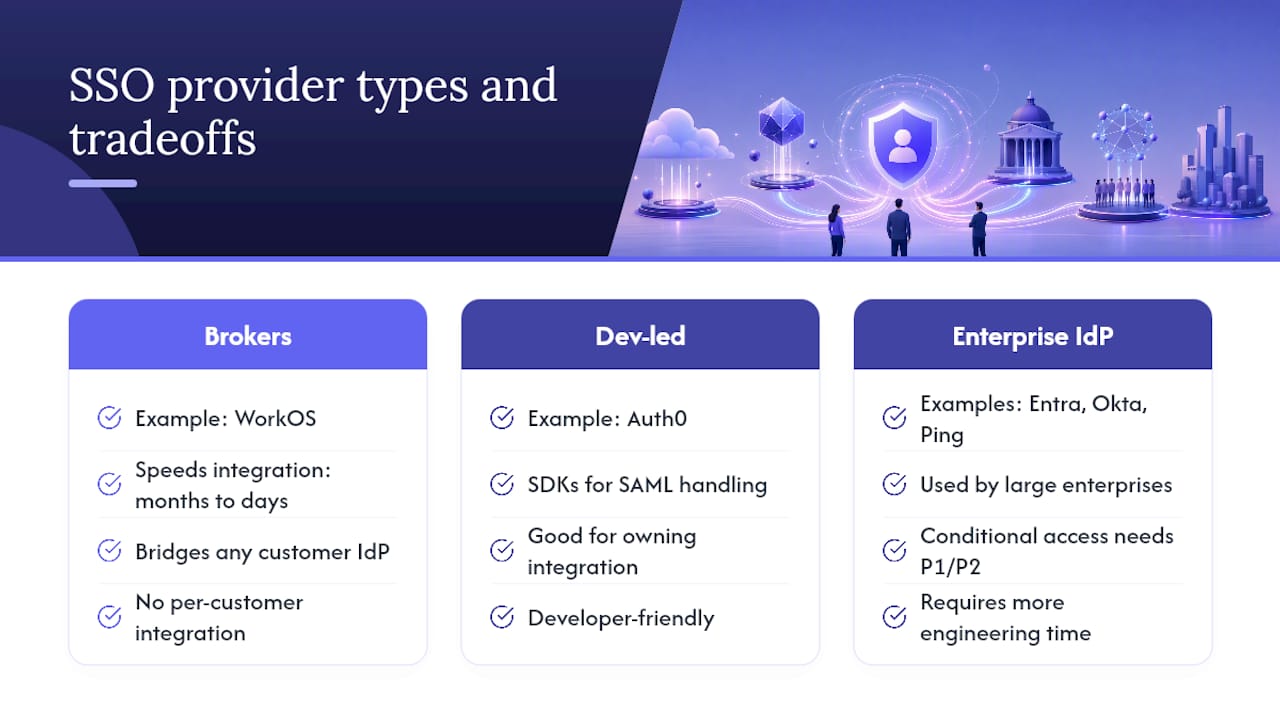
Not every identity provider on this list solves the same problem. Some are full identity platforms your enterprise customers already run internally. Others are brokers built specifically to sit between your app and whatever IdP your customer uses. Knowing which is which changes how fast you ship.
Microsoft Entra ID (formerly Azure AD) is the default IdP for any customer already running Microsoft 365, and its documentation on SAML configuration is detailed enough to build against directly, including certificate rotation behavior and NameID guidance. Basic SAML SSO is configurable without a premium license, but conditional access and automated group provisioning require a P1 or P2 add-on, which matters when you’re scoping what your customer will actually have available.
Okta and Ping serve a similar role for larger enterprises that centralize identity independently of Microsoft, and both show up constantly in procurement conversations because IT teams already trust them as the system of record. Ping in particular tends to appear in complex federation scenarios, like large enterprises with multiple subsidiaries or acquired companies running separate identity domains.
Auth0 sits closer to your side of the fence. It’s built for teams that want to own the integration logic but don’t want to write SAML XML parsing from scratch, and its SDK coverage makes it a common pick for developer-led SaaS teams.
WorkOS occupies a different lane entirely. It’s not an identity provider your customers log into. It’s a bridge that sits between your app and whatever IdP your customer already has, prebuilt to handle the connection so you don’t maintain a separate integration for every enterprise account. Identity brokers like this cut integration time from months to days by translating varied IdP protocols into one API your app talks to.
Keycloak is the outlier for teams that want zero vendor dependency. It’s open-source, self-hostable, and can act as either IdP or SP, but you own the infrastructure, the uptime, and the security patching. Google Workspace’s identity layer is worth naming mainly because so many customers are already standardized on it; if your buyer runs Workspace, it’s often the path of least resistance. JumpCloud rounds things out as a directory-as-a-service option, useful when a customer wants SSO bundled with device management rather than as a standalone federation layer.
If your goal is closing enterprise deals fast without hiring a dedicated identity engineer, WorkOS-style brokers and Auth0 shorten the runway. If your customer base skews toward large, security-mature enterprises that expect deep conditional access policy and audit tooling, expect to integrate directly with Entra ID, Okta, or Ping, and budget more engineering time for it.
How Does SAML Architecture Work in a Multi-Tenant SaaS App?
SAML SSO involves two roles: the Identity Provider (IdP), which authenticates the user and issues a signed assertion, and the Service Provider (SP), which is your SaaS app. Your app’s job is to trust the assertion, verify its signature, and turn it into a session. Getting this right for one customer is straightforward. Getting it right for a hundred tenants, each with a different IdP, is where most teams stumble.
There are two ways the flow can start:
- SP-initiated: the user visits your app, clicks “log in with SSO,” your app redirects them to their IdP with a signed authentication request, and the IdP redirects back with a signed assertion.
- IdP-initiated: the user starts from their company’s identity portal (like the Okta or Entra dashboard) and lands directly in your app with an assertion already in hand.
Practitioner guidance favors SP-initiated flows by default because they give you clean control over tenant binding and reduce the risk of assertion injection. IdP-initiated flows skip that control, since your app has no prior context about which tenant is logging in until the assertion arrives, so reserve them for customers who specifically require it.
Every SAML integration runs on a small set of metadata values, and if you’re building this yourself, these are the fields you’ll configure repeatedly:
- Entity ID: a unique identifier for your SP, usually a URL.
- ACS URL (Assertion Consumer Service): where the IdP sends the signed assertion back.
- Sign-on URL: where your app redirects the user to start authentication.
- X.509 certificate: used to verify the IdP’s signature on incoming assertions.
Documentation from providers like Vercel lays out these exact fields with working examples, which is a faster way to understand the shape of a real configuration than reading the SAML spec directly.
In a multi-tenant app, you can’t hardcode one Entity ID and one ACS URL. Each tenant’s IdP connection needs its own metadata, which usually means exposing a dynamic per-tenant metadata endpoint (something like /saml/{tenant-id}/metadata) rather than a single static one. The ACS URL should encode enough context to resolve which tenant an incoming assertion belongs to before you even validate the signature.
Signature verification isn’t optional and isn’t something to write from scratch. Delegate it to a maintained SAML library. Beyond the signature itself, check the Audience Restriction (confirming the assertion was actually issued for your app) and the Conditions block (checking the assertion hasn’t expired). For the NameID, use an immutable identifier rather than email as the authoritative identity key. Emails change when someone gets married, switches departments, or a company rebrands its domain, and if your authorization logic is keyed to email, that person silently loses access or, worse, inherits someone else’s account history.
What’s the Implementation Checklist for Tenant-Scoped SAML?
Once the architecture is clear, the actual build comes down to a sequence of steps, and the order matters more than most teams expect. Getting the sequence wrong — validating an assertion before resolving which tenant it belongs to, for instance — is a common source of cross-tenant login bugs.
- Resolve the tenant first. Determine which tenant a login attempt belongs to, either from the subdomain, a query parameter, or the RelayState value, before you touch the assertion.
- Load that tenant’s SAML config. Pull the tenant-specific Entity ID, ACS URL, and IdP certificate. Never share one global config across tenants.
- Expose a per-tenant metadata endpoint. Let each customer’s IT team pull your SP metadata (Entity ID, ACS URL, certificate) without support tickets.
- Build the ACS endpoint to accept POST-bound assertions. This is where the IdP sends the signed response.
- Validate the signature using a maintained library. Never parse or verify SAML XML by hand.
- Check Audience Restriction and Conditions. Confirm the assertion was issued for your app and hasn’t expired.
- Bind the session strictly to the resolved tenant. Reject the login if the assertion’s issuer doesn’t match the tenant you resolved in step one.
- Sign and validate RelayState. This prevents an attacker from redirecting a valid login into the wrong destination.
- Map attributes to roles using tenant-owned rules. Never apply a global mapping across all customers.
- Test against a staged IdP before enforcing SSO. Use a sandbox tenant to confirm the full round trip before flipping the switch for a real customer.
Role and attribute mapping deserves its own attention, because it’s where security incidents actually happen. Store every mapping as a tenant-owned record with a createdBy and updatedAt field, apply the mapping only after the assertion’s signature has been verified, and log every change to that mapping in an immutable audit trail. Give admins a real UI to manage these mappings instead of a support ticket queue, because customers will ask to change them constantly as their org restructures.
On the operational side, a few practices separate a stable SSO implementation from one that breaks quietly six months in:
- Rotate certificates with an overlap window. Publish the new certificate in metadata before the old one expires, so IdPs that cache metadata infrequently don’t suddenly reject valid assertions.
- Store assertion IDs to prevent replay. Reject any assertion whose ID you’ve already processed.
- Choose session lifetimes deliberately. A SAML session that never expires defeats the purpose of centralized deprovisioning.
- Log every authentication event. Successful and failed logins, mapping changes, and certificate updates all belong in an audit trail your customer’s security team can request.
- Don’t enforce SSO for a tenant until you’ve tested it with a real staged login. Turning it on blind locks out the exact users you’re trying to keep happy.
Pro Tip: Keep a break-glass admin account outside the SSO flow for every tenant. When a customer’s IdP has an outage, and it will happen eventually, you need a way in that doesn’t depend on their infrastructure.
What Operational Habits Actually Prevent SAML Incidents?
Most SAML security incidents in production don’t come from a broken cryptographic implementation. They come from operational shortcuts: a certificate that expired without anyone noticing, or a role mapping that quietly granted admin access to the wrong group.
Certificate rotation is the one that catches teams off guard because it’s invisible until it fails. Entra ID’s default signing certificates carry a three-year validity window, which sounds generous until you realize most engineering teams don’t have a calendar reminder for something they set up once during onboarding two years ago. Build a rotation schedule with real overlap, publish the new certificate through metadata before the old one expires, and treat metadata consumption as something your customers’ IdPs may only refresh periodically, not instantly.
The role-mapping anti-pattern is more subtle. It’s tempting to write one mapping rule like “if IdP group contains ‘admin’, grant app admin role” and apply it globally across every tenant. That single rule is a privilege escalation waiting to happen, because group naming conventions vary wildly between organizations, and a group called “IT-Admins” at one customer might mean something completely different at another. Store mappings per tenant, require human review before a mapping grants your highest privilege role, and log every change.
- Rotate signing certificates on a schedule, not reactively.
- Never apply a single role-mapping rule across every tenant.
- Apply mappings only after signature verification, never before.
- Log every mapping change with who made it and when.
- Default to SP-initiated flows for cleaner CSRF and replay protection.
Preferring SP-initiated flows over IdP-initiated ones isn’t just a style choice. It closes off a real attack surface, since your app controls the request that starts the flow and can bind it to a specific tenant and session from the first redirect, rather than trusting an assertion that showed up out of context.
Speed Gets You the Deal, Maintenance Keeps It
Every SaaS team building SAML SSO faces the same tension: procurement wants it fast, and engineering knows fast implementations accumulate operational debt. Both instincts are right, which is exactly the problem.
Speed wins when you’re closing your first few enterprise logos and don’t yet know which IdPs your customer base actually runs. A broker gets you a working integration without betting engineering months on a feature you might touch twice a year. Custom control earns its cost once you have real scale and patterns repeat: dozens of tenants on Entra ID, a security team asking for conditional access nuances a broker doesn’t expose, or compliance requirements that demand you own the full audit chain yourself.
Product managers should budget SSO as a recurring line item, not a project with an end date. Certificate rotation, role-mapping reviews, and IdP-specific quirks don’t stop after launch. If you want a concrete example of how a product documents this for IT buyers, TrailerCast publishes its own security practices for teams evaluating exactly this kind of enterprise readiness.
— Daniel
Where TrailerCast Fits if You’re Evaluating Sales Tools With SSO
If you’re the one now trying to figure out which of your own SaaS vendors need enterprise SSO, sales tooling is usually near the top of that list, since it touches customer conversations, contracts, and pipeline data your security team already cares about.

TrailerCast isn’t an identity broker or an SSO provider. It’s the platform that runs your sales deals, from the first call through the signed contract, and it supports SAML SSO as an enterprise add-on so your IT team can bring it under the same identity controls as everything else in your stack. If you’re standardizing vendor access on Entra ID, Okta, or another IdP, that matters more than another point solution that makes your security review longer. TrailerCast’s admin checklist for SAML SSO in sales tools walks through exactly what your IT team will need to configure the connection cleanly, and the security documentation covers what a procurement reviewer typically asks for.
Every plan on TrailerCast includes every feature, starting from $59 per seat per month billed annually, with SSO/SAML sitting on top as an enterprise add-on for teams that need it. If you’re consolidating your sales stack and want to see whether it fits your identity requirements, check the platform out and bring your IT team into the conversation early.
Sources
For the mechanics of SP/IdP configuration, start with Microsoft’s SAML architecture guide and Vercel’s SAML documentation for concrete metadata field examples. For production patterns around tenant scoping and RelayState handling, AverageDevs’ implementation guide is worth a full read. For role-mapping policy and audit logging, consult Palo Alto Networks’ identity role mapping documentation, and for broader security posture planning, Netverge’s security resources cover considerations relevant to any SaaS handling enterprise customer data.
- SAML authentication with Microsoft Entra ID
- Enterprise SSO Solution for SaaS Apps
- SAML SSO for B2B SaaS in Next.js: Production Patterns That Do Not Hate You Back - AverageDevs
- SAML Single Sign-On (Vercel docs)
FAQ
Should Every SaaS Product Support SAML SSO?
Not every SaaS product needs it on day one, but products targeting enterprise buyers will eventually hit a deal where SAML SSO is a procurement requirement. Products targeting enterprise buyers from the start should build or broker it before it blocks a deal in progress.
What’s the Difference Between SAML and OIDC for SaaS?
SAML uses XML-based assertions and is the older, more established standard for enterprise identity federation, while OIDC is a newer, JSON-based protocol built on OAuth 2.0. SAML remains the more commonly requested standard in enterprise procurement, particularly with older identity stacks, even though OIDC is often simpler to implement.
How Long Does It Take to Implement SAML SSO?
Building SAML SSO from scratch, including tenant scoping and certificate handling, typically takes several weeks to a few months depending on your team’s identity expertise. Using a broker like WorkOS or Auth0 can cut that timeline to days since the IdP-specific integration work is already prebuilt.
Does TrailerCast Support SAML SSO?
Yes. TrailerCast offers SAML SSO as an enterprise add-on alongside custom data processing agreements and white-label options, documented in its security resources for IT teams evaluating the platform.
What’s the Biggest Mistake Teams Make Implementing SAML?
The most common production issue is applying a global role-mapping rule across every tenant instead of storing mappings as tenant-owned, individually reviewed records. That single shortcut is a recurring cause of privilege escalation in multi-tenant SaaS applications.