Minute by Minute QBR Template That Turns Status Into Decisions for CS

The most useful QBR template is a tight six-section agenda: verdict, goals, outcomes, adoption, issues, and next-quarter plan. Pair it with a 48-hour pre-read and a Decision/Owner/Date action log, and you can run it as a 45, 60, or 90-minute meeting, or even async. Everything below is copy-paste ready, including minute-by-minute run-of-show scripts for each format.
TL;DR:
- Keep QBR scorecards limited to 6 to 10 KPIs that are traceable over multiple quarters and directly linked to decision triggers.
- Use a timed agenda for each format to prioritize decision-making, not just reporting, regardless of meeting length or delivery method.
- Send a detailed pre-read 48 hours in advance with KPI trends, value proofs, top risks, and draft goals to focus the actual meeting on decisions.
- End every agenda section with Decision / Owner / Date to ensure actions are tracked and accountability is clear.
- Utilize AI tools to automate call transcripts, highlight moments of value or risk, and generate evidence to reduce prep time from days to minutes.
Table of Contents
- What Is a QBR Template and When Should You Use One?
- Core QBR Template: A Copy-Paste Six-Section Backbone
- Run-of-Show Agendas for 45, 60, 90, and Async QBRs
- QBR Scorecard: KPIs, Formulas, and Benchmark Guidance
- Before the QBR: Pre-Read Checklist and Roles
- How to Run the Meeting: Timebox, Read Back, Close
- Common QBR Mistakes and How to Fix Them
- How AI Platforms Can Cut QBR Prep Time
- One Tactical Tip for Every QBR You Run
- How Trailercast Cuts QBR Prep From Days to Minutes
- Sources
What Is a QBR Template and When Should You Use One?
A quarterly business review is a governance checkpoint held every few months, not a status meeting. Its job is to turn a period of usage data and conversations into a small number of decisions: renew, expand, fix, or escalate. ClickUp’s operations guide frames QBRs as the primary governance mechanism for strategic accounts, which is exactly why a rushed status readout wastes everyone’s time in the room.
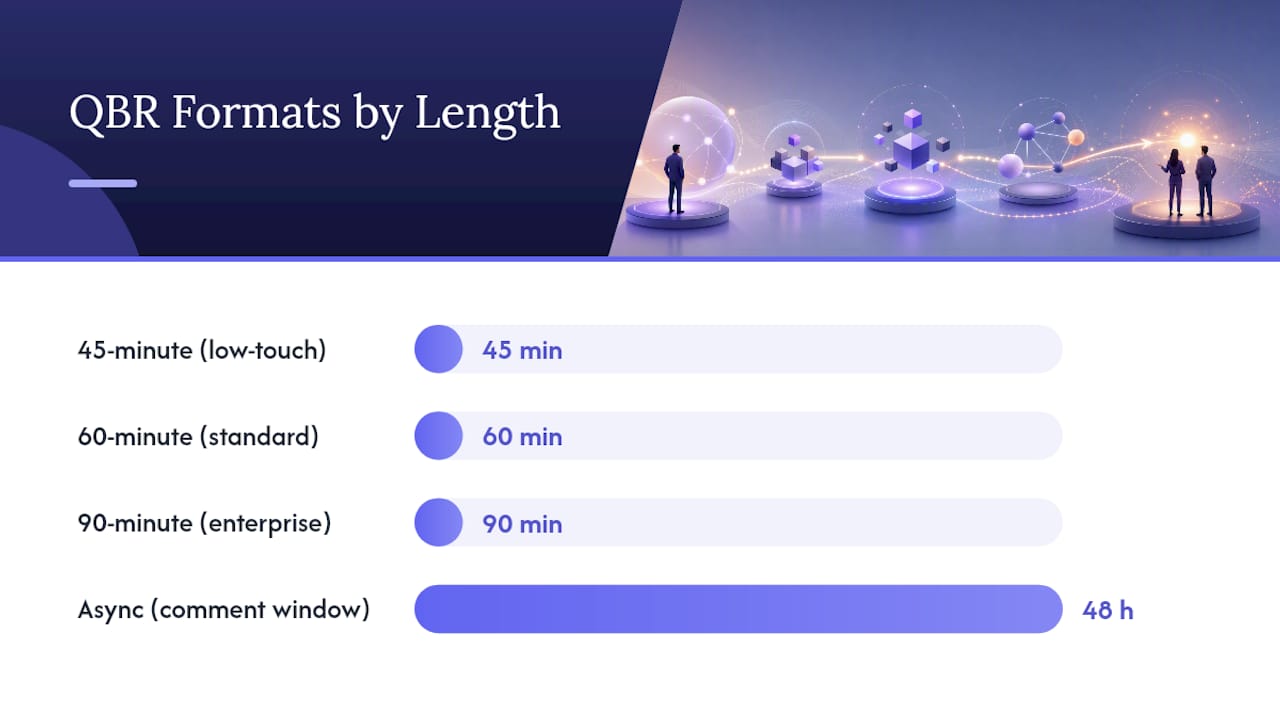
Who shows up depends on the stakes. Executive sponsors need the 45 or 60-minute version with a tight decision block. Working teams tracking a rocky implementation often need the full 90 minutes to walk through roadmap detail. Low-touch accounts or teams spread across time zones can skip the live call entirely and use an async format.
The format you pick should match the account, not your calendar:
- 45 minutes: Low-touch or mid-market accounts with a stable relationship and one or two decisions on the table.
- 60 minutes: The default for most executive-facing reviews, balancing a value recap with real decision time.
- 90 minutes: Enterprise accounts with multiple stakeholders, a roadmap discussion, and cross-functional blockers.
- Async: Distributed buying committees or accounts where a live meeting adds friction, not value.
Whatever the length, the meeting only succeeds if it ends with decisions, owners, and dates on paper, not a deck everyone nodded through.
Core QBR Template: A Copy-Paste Six-Section Backbone
Paste this into a slide deck or a shared doc and fill in the brackets. It works for the full quarterly business review agenda regardless of which run-of-show length you choose.
Header: Account name, quarter, attendees, one-line verdict. Example: “Q3 verdict: on track for renewal, two open risks on integration timeline.”
1. Goals we agreed last quarter. List each goal, mark it hit, partial, or missed, and add one sentence explaining why. Skip the excuses; state the cause.
2. Outcomes in the customer’s own numbers. Report results using the metrics that matter to them (hours saved, tickets deflected, revenue influenced), not your product’s vanity stats.
3. Adoption. Active users versus licensed seats, feature adoption by team, and any drop-off worth flagging.
4. Issues: reported versus resolved. A short table of what broke, when it was reported, and the date it shipped. This is where trust is built or lost.
5. Risks and open questions. Name the risk, who owns tracking it, and what would trigger escalation.
6. Next quarter’s goals. Each goal gets an owner and a date, no exceptions.
Every section should end with a line for Decision / Owner / Date so nothing gets discussed and then forgotten. That single habit is what separates a working QBR agenda template from a slide deck nobody rereads.
Run-of-Show Agendas for 45, 60, 90, and Async QBRs
Timeboxing is what keeps a QBR from turning into an hour of reading numbers aloud. Prospeo’s run-of-show guidance recommends circulating scores before the meeting and protecting the live time for decisions, not recaps.
45-minute run-of-show (low-touch accounts):
- Minutes 0 to 5: Verdict and agenda check.
- Minutes 5 to 15: Goals and outcomes, fast.
- Minutes 15 to 30: Issues and risks, discussion only on what’s unresolved.
- Minutes 30 to 40: Decision block, next-quarter goals.
- Minutes 40 to 45: Read back Decision/Owner/Date, confirm next meeting.
60-minute run-of-show (standard executive review):
| Block | Minutes | Focus |
|---|---|---|
| Open | 0 to 5 | Verdict, attendees, agenda |
| Value proof | 5 to 20 | Outcomes and adoption in customer numbers |
| Issues and risk | 20 to 30 | Reported vs. resolved, open risks |
| Decision block | 20 to 30 | Renewal, expansion, escalation calls |
| Close | 45 to 60 | Next-quarter goals, Decision/Owner/Date readback |
90-minute strategic agenda (enterprise accounts): Follow the 60-minute structure, then add 20 minutes for roadmap alignment and 10 minutes for open Q&A with additional stakeholders. If you find you consistently need more than 90 minutes, that’s a signal to split unresolved operational issues into a separate working session rather than stretching the QBR further.
Async QBR: Build a one-page summary (verdict, top three outcomes, top risk), a short narrative document expanding each section, and an appendix with supporting data. Set a firm 48-hour comment deadline and follow up with a short call only if a decision stalls.
QBR Scorecard: KPIs, Formulas, and Benchmark Guidance
A scorecard with 20 metrics is not a scorecard, it’s a distraction. Keep it to 6 to 10 KPIs across three categories, and map each one to a decision it could actually trigger, as Profit.co’s QBR guide recommends when framing reviews around OKRs rather than raw status.
- Adoption: Active users / licensed seats, feature adoption rate by team.
- Outcomes: Time saved, revenue influenced, tickets deflected, whatever ties directly to the customer’s stated goals.
- Risk signals: Support ticket volume trend, executive sponsor turnover, usage decline over the trailing 30 days.
- Commercial: Contract value trend, expansion pipeline, renewal date proximity.
Pro Tip: Present every KPI as a trend line covering at least two quarters, never a single snapshot number. A snapshot invites debate about definitions; a trend invites a decision about direction.
For SaaS-specific KPI definitions and benchmark ranges, Consult EFC’s SaaS metrics guide is a solid reference when you need a formula, not just a label, and the sales team KPI framework from Cornerstone Search helps when the scorecard needs to speak to a VP of Sales rather than a CS lead.
Before the QBR: Pre-Read Checklist and Roles
Send a one to two-page pre-read 48 hours before the meeting. This single habit, backed by Prospeo’s template guidance, is what lets you skip reading numbers aloud and go straight to decisions.
The pre-read should include:
- KPI trend summary (not raw numbers)
- Top three value proof points in the customer’s language
- Top three risks with owners
- Proposed decisions for the meeting
- A draft next-quarter action plan
Assign roles ahead of time: a driver who owns the agenda and keeps time, a note-taker who logs Decision/Owner/Date live, and a decision owner on each side empowered to actually commit resources. HBR’s guidance on meeting design backs this structure because unclear ownership is the single most common reason meetings produce discussion instead of outcomes.
Pro Tip: If a stakeholder can’t send feedback on the pre-read by the deadline, assume silence means agreement and say so explicitly in your invite. It forces a response instead of a no-show.
How to Run the Meeting: Timebox, Read Back, Close
Protect the decision block above everything else. If a section runs long, cut discussion, not the decision time at the end. Everything else can wait for a follow-up call; the decisions cannot.
- Timebox every block on the agenda and say the time out loud when you start it.
- Record Decision / Owner / Date live, on screen, as it happens, not from memory afterward.
- Read the full action list back before anyone leaves the call and confirm each owner’s contact details.
- Send a recap within 24 hours and set a checkpoint date to verify the first actions actually closed.
Turning post-meeting action items into a visible, dated list is what separates a QBR that changes the account’s trajectory from one that just felt productive.
Common QBR Mistakes and How to Fix Them
Most QBRs fail in predictable ways, and each one has a quick fix.
- Reading the deck live. Fix: require the pre-read and set a hard comment deadline 48 hours out.
- Cramming in 20 KPIs. Fix: limit the scorecard to 6 to 10 metrics, each mapped to a decision.
- No decision log. Fix: end every section with Decision / Owner / Date, with no exceptions, even when the answer is “no decision needed yet.”
- Product updates eating the agenda. Fix: push feature news to an appendix unless it directly supports a customer goal.
How AI Platforms Can Cut QBR Prep Time
Building the outcomes section by hand, scrolling through a quarter of call recordings for the one quote that proves value, is where most QBR prep time disappears. Automated transcripts and moment detection change that math: instead of rewatching four months of calls, you search them, and the tool surfaces the exact moment a stakeholder confirmed a result mattered.
A demo trailer built from the highlights of real calls does something a slide deck can’t: it lets the customer hear their own team validate the outcome, in their own words, instead of trusting your summary of it.
Decision rooms that track engagement across a buying committee, and handoff briefs that auto-generate at close, feed the same scorecard you’re building for the QBR: who engaged, what was promised, what risks were flagged. Stakeholder mapping becomes far easier when engagement data already exists instead of being reconstructed from memory before every review.
Pro Tip: If you’re pulling quotes from recorded calls for a QBR deck, check your call recording consent practices first. Evidence only helps you if it was captured properly.
One Tactical Tip for Every QBR You Run
Standardizing the template matters because a customer who sees the same six-section structure every quarter stops parsing format and starts engaging with substance. Put your single most important decision in the first five minutes, not buried at the end when attention has drained. Adjust the wording in each section to match how your specific customer talks about success, not how your product team does.
— Daniel
How Trailercast Cuts QBR Prep From Days to Minutes
Trailercast is built for the exact bottleneck that makes QBR prep painful: turning a quarter of scattered calls into evidence you can actually put on a slide. Instead of scrolling through recordings hunting for the one moment a stakeholder confirmed ROI, the AI notetaker builds structured summaries and searchable transcripts as calls happen, then the moment-detection engine pulls the highlights into a shareable trailer.

That means your outcomes section gets a real customer quote instead of a paraphrase, your risks section gets pulled straight from flagged moments in recent calls, and your decision room already shows who on the buying committee engaged with what. Pair that with auto-generated handoff briefs that carry stakeholder context forward after close, and your next QBR starts with real evidence instead of a blank template. See how the full platform handles the workflow, or check the feature breakdown for RevOps teams building this into a standing process.
Sources
For deeper walkthroughs, ClickUp’s QBR guide covers governance framing, Prospeo’s run-of-show template offers a downloadable 60-minute script, and Dynamic Growth Solutions breaks down QBR design for technology accounts specifically.
- QBR: Agenda, Best Practices, and Template — ClickUp
- QBR Agenda Template: 60-Min Run of Show (2026 Guide) — Prospeo