B2B Sellers: Close Committee Deals with AI Multilingual Demo Trailers

A multilingual demo video, in the sense that matters for active B2B deals, is an AI-edited trailer built from your recorded demo and localized into a stakeholder’s own language so people who never joined the call can still make sense of what you sold on it. The best move right now: pull your last demo recording, identify the most influential person who wasn’t in the room, and cut a short trailer aimed squarely at their concern. Send it before your champion has to explain the deal from memory.
TL;DR:
- Localizing trailers with subtitles is faster and more cost-effective than dubbed narration unless the stakeholder’s role genuinely requires understanding nuanced audio content.
- Focus on creating short, role-specific trailers around key moments like post-demo follow-ups, mid-funnel stakeholder briefings, or late-stage validation, not on translating entire demos.
- Tracking engagement signals such as watch time, segment replays, and sharing provides insights into interest and decision points, which should guide follow-up timing.
- Using an integrated platform that automates highlight selection, localization, and CRM syncing reduces manual handoffs and improves deal continuity across multiple languages.
- Reserve trailer outreach for high-leverage moments and avoid overusing it, as excessive sends can cause stakeholder fatigue and reduce overall engagement effectiveness.
Table of Contents
- What Is a Multilingual Demo Video, and When Should You Send One?
- How to Create a Multilingual Demo Trailer From a Recorded Demo
- Subtitles or Dubbed Narration: Which Localization Fits Your Deal?
- Where to Send Multilingual Trailers and What to Track
- Turning Engagement Into a Repeatable Testing Program
- Getting the Basics Right Before You Scale Testing
- Why the Integrated Workflow Is the Real Unlock
- See What a Multilingual Demo Trailer Looks Like in Practice
- Sources
What Is a Multilingual Demo Video, and When Should You Send One?
A multilingual demo video is not your full demo call translated end to end. It’s a short, edited trailer, sourced from a recording you already have, that gets subtitled, dubbed, or narrated in another language and aimed at one specific stakeholder. Three moments call for one:
- Post-demo leave-behind. Your champion just watched the call. Now they need something to forward to the two people who didn’t.
- Mid-funnel persona brief. A new stakeholder enters the deal (finance, security, procurement) and needs a fast, role-specific answer, not a 45-minute recording.
- Late-funnel validation. The deal is close to signature and someone senior wants a final gut check without sitting through the whole sales cycle.
Each stakeholder needs a different opening. A CFO trailer should lead with ROI and total cost, not screen tour. A CISO trailer should open on architecture and data handling. An end user cares about workflow disruption on day one. Interactive, persona-specific demos deployed mid-funnel measurably increase internal alignment, mostly because most buying-committee members simply never attend the live call. Match the CTA to the moment: leave-behinds ask for a quick reaction, mid-funnel briefs ask for one specific question answered, and late-funnel trailers ask directly for the signature.
How to Create a Multilingual Demo Trailer From a Recorded Demo
Building a usable trailer is a five-step workflow, and skipping steps is where teams lose language quality or waste hours re-editing later.
- Capture with reuse in mind. Record in a stable resolution, keep your screen share clean of unrelated tabs, and narrate clearly enough that a transcript engine can catch every word. Treat the recording as raw footage, not a finished asset.
- Auto-edit for the highlight, not the whole call. AI editing tools scan the transcript for moments tied to pricing, security, or workflow and cut a trailer around them. Aim for 60 to 120 seconds. Effective personalized sales videos front-load a specific observation and close with one clear ask, which is exactly the shape a good trailer needs: intro, one core insight, agenda tease, outro CTA.
- Localize the language layer. Start with subtitles generated from the transcript, since they’re fast and cheap to produce in any language. Move to dubbed or cloned-voice narration only when the stakeholder’s native language carries real weight in their decision, or when literacy or accessibility needs make audio the better delivery.
- Personalize the swaps. Change the opening line to name the stakeholder’s role and their stated concern, and drop in a one-line annotation over the segment that matters most to them. A human-recorded core merged with recipient-specific elements keeps the trailer feeling authentic instead of templated.
- Deliver with metadata attached. Name files by deal, stakeholder role, and language (e.g.,
acme_ciso_es.mp4), store the transcript alongside the video, and tag both in the CRM record so a teammate picking up the deal later doesn’t start from zero.
Pro Tip: Store the full call transcript and the trimmed trailer transcript separately, each tagged with its language. When legal or compliance asks what a translated clip actually says, you’ll have the answer in seconds instead of re-watching the video.
Before you send anything, run the checklist: correct deliverable format for the platform you’re using, transcript saved, CRM attachment added, and the right persona tag applied. Skipping the CRM step is the single most common reason engagement data never makes it back to the deal record.
Subtitles or Dubbed Narration: Which Localization Fits Your Deal?
Subtitles are the right default. They’re fast, cheap, and accurate enough for most buying-committee sharing, especially when the stakeholder is comfortable reading in a second language or the trailer is going to a technical audience that skims rather than watches start to finish.
Dubbed or cloned-voice narration earns its cost when the stakeholder’s comfort matters more than speed, when the message is emotionally weighted (a late-stage validation ask, for instance), or when accessibility needs make audio the primary channel. A few guardrails:
- Run machine translation through a human review pass before recording narration. Short scripts hide translation errors that longer text would expose.
- Cloned-voice narration scales faster than booking a professional voiceover artist, but only use it with the original presenter’s explicit consent.
- Add a brief on-screen caption noting the narration is synthesized for localization. It’s a small transparency step that protects trust with the stakeholder and keeps you clear of consent gray areas.
- Keep the script tight. A 90-second trailer with a bloated translated script reads as padded in any language.
Where to Send Multilingual Trailers and What to Track
Delivery surface shapes what you learn. A no-login buyer-facing deal room gives you per-stakeholder engagement without forcing anyone through a signup wall. A single tracked link in an email or LinkedIn message works when the deal room feels heavy for the moment. Either way, keep the landing flow to one click and one clear next step.
Four signals matter more than the rest:
- Watch time, the strongest single indicator of real interest.
- Completion rate, which flags whether the trailer length actually fit the audience.
- Replays of pricing or architecture segments, since rewatching a specific segment signals a live objection being worked through internally rather than passive viewing.
- Forward and share attribution, showing exactly who your champion looped in.
Route all four into the opportunity record and set alerts for two triggers: a brand-new viewer opening the trailer, and any replay of a pricing or security segment. Both usually mean someone new just entered the decision, and timing your follow-up to that moment beats guessing.
Turning Engagement Into a Repeatable Testing Program
Treat watch time as your baseline metric, not a vanity number. High-intent engagement generally looks like near-full completion plus at least one replay of a pricing or architecture clip within 48 hours of sending.
Run these tests in sequence rather than all at once, since stacking variables makes results impossible to read:
- Subtitles versus native audio for the same stakeholder role, watching completion rate as the tiebreaker.
- Persona intro variants, testing whether naming the stakeholder’s specific concern in the first five seconds changes watch time.
- CTA phrasing, comparing a soft “let me know your thoughts” against a direct “grab 15 minutes to walk through pricing.”
Give each test a two-to-four week window and enough trailer sends to compare apples to apples. A dozen sends per variant is a reasonable floor before you draw a conclusion. Once a variant wins, track it through to the pipeline stage it’s meant to move, whether that’s advancing a stalled opportunity or shortening time between demo and signature, and report the shift alongside your usual RevOps pipeline metrics rather than as a standalone video stat.
Getting the Basics Right Before You Scale Testing
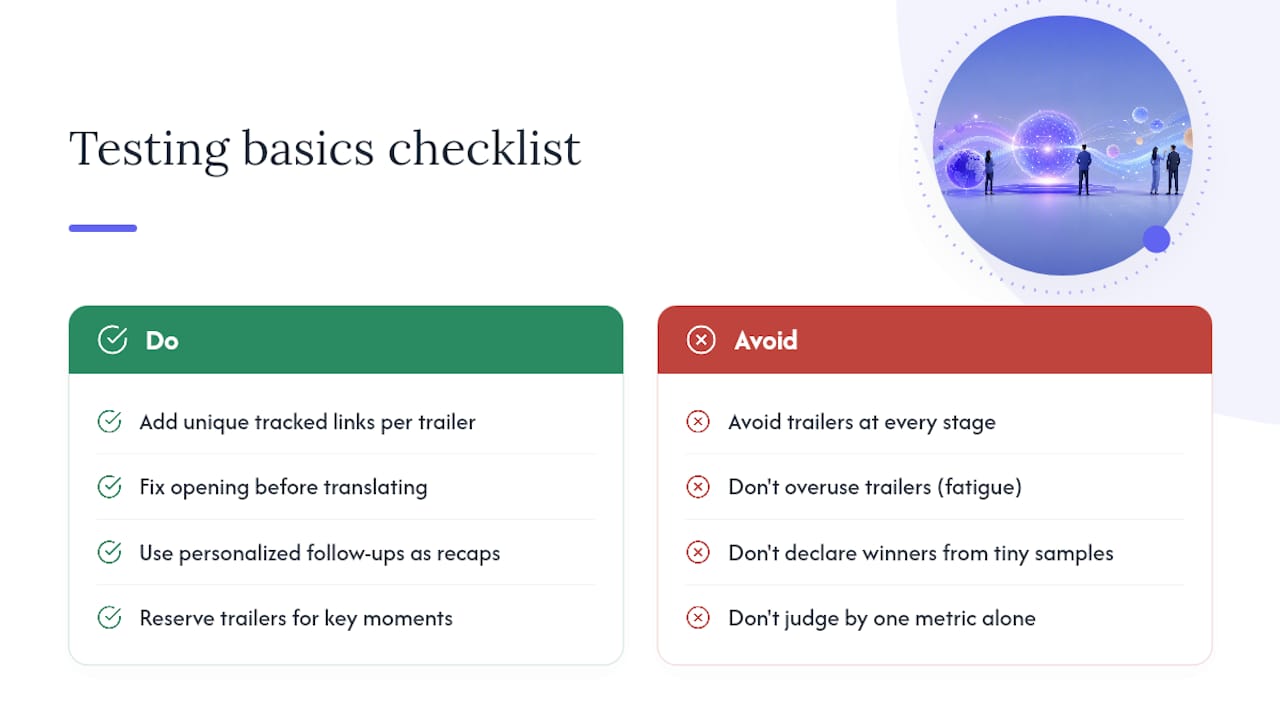
Before running formal A/B tests, get the fundamentals of measurement in place, because a testing program built on bad instrumentation just produces confident wrong answers. Make sure every trailer sent carries a unique tracked link, even when two stakeholders are getting near-identical content, so you can tell whose engagement belongs to whom.
Fix the opening before touching translation quality.
Personalized video follow-ups function best as post-demo recaps rather than generic touches, so resist the urge to send a trailer at every single stage of a deal. Overusing video creates the same fatigue as overusing email, and a stakeholder who’s received three trailers in a week starts ignoring all of them. Reserve trailers for high-leverage moments: right after a demo, when a new stakeholder joins, and near a decision point.
Keep your sample expectations realistic. A handful of sends won’t tell you much about which variant wins. Wait until you’ve got a real batch of comparable sends across similar deals before declaring a CTA phrasing or intro style the winner, and always weigh watch time alongside completion rate rather than either number alone.
Why the Integrated Workflow Is the Real Unlock
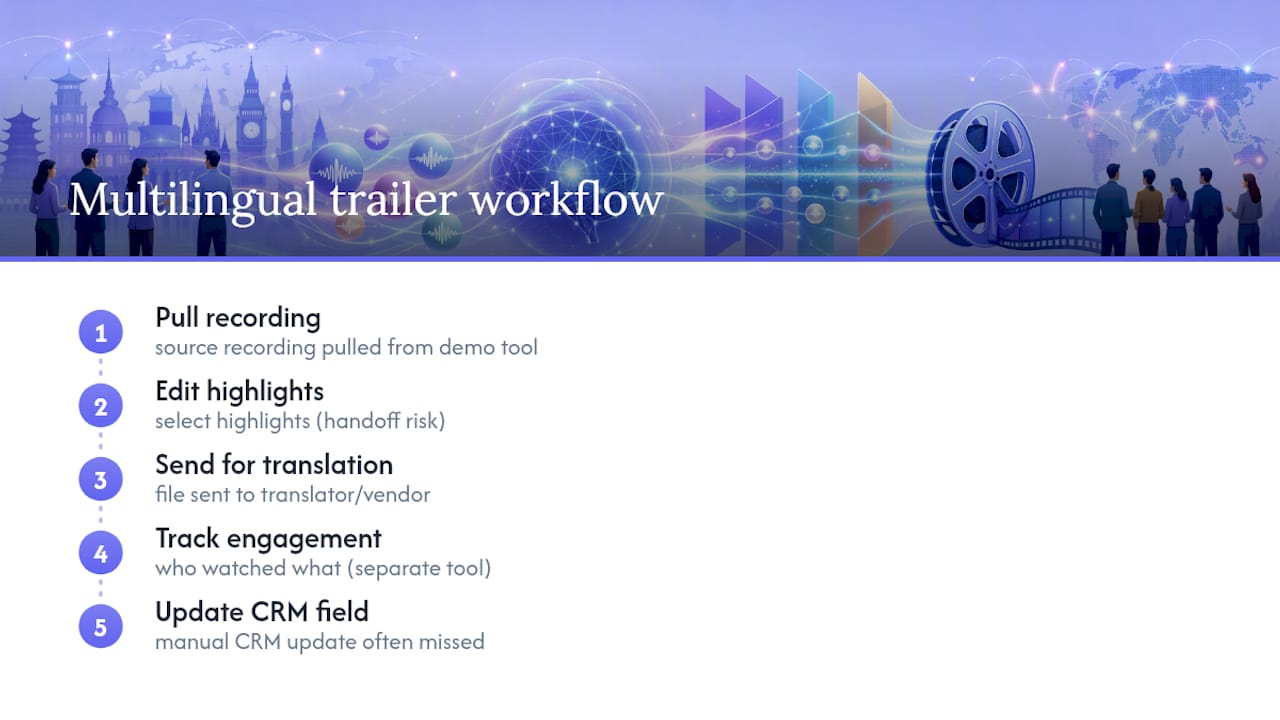
Most of the friction in multilingual trailer production has nothing to do with language. It’s the handoff between five disconnected steps: pulling the recording, editing highlights, sending a file to a translator, tracking who watched what, and manually updating a CRM field that nobody remembers to touch. Every handoff is a place a deal quietly stalls.
An integrated platform that auto-selects highlights, builds the trailer, hosts the decision room, and syncs engagement straight to CRM removes those handoffs rather than making each one faster. That’s a meaningfully different problem to solve. The trailer, the transcript, and the stakeholder engagement data all live in one place instead of scattered across a video tool, a translation vendor, and a spreadsheet someone updates on Fridays.
What actually proves this out is watching a deal where three stakeholders join late, in three different languages, and the seller never has to rebuild the trailer from scratch for each one. The persona swap and the localization layer both happen inside the same workflow that already knows the deal history.
— Daniel
See What a Multilingual Demo Trailer Looks Like in Practice
Trailercast turns your recorded demo into a branded trailer automatically, picks the 8 to 15 minutes that actually mattered, and can narrate it in a cloned voice across 15-plus languages, so a CFO in São Paulo and a CISO in Berlin each get a version built around what they care about.

Every trailer lands in a no-login decision room where you can watch per-stakeholder engagement in real time, and that activity flows straight into the opportunity record without a manual update. Pricing runs a flat $79 per seat monthly, or $59 billed annually, with a free trial and no credit card required. If you’re currently juggling a screen recorder, a translation vendor, and a separate deal room tool for this exact workflow, start a free trial and see how much of that disappears into one workspace.
Sources
For a closer look at building trailers directly from your sales calls, Trailercast’s demo trailer page walks through the auto-editing process, and the highlight reel feature covers branded output options. On the research side, Walnut’s guide to interactive, persona-specific demos and Stealery’s breakdown of personalized video structure both go deeper into the engagement mechanics behind why shorter, targeted trailers outperform full-length recordings.
- Interactive Demo Platform | AI-Powered Demos | Walnut
- How to Use Personalized Video to Shorten Sales Cycles
- Personalized Video in Cold Outreach: Does It Still Work in 2026? — Stealery
- Personalized Video Outreach: The Complete Guide to Video Messages That Actually Get Replies - Spokenote