Best Loom Alternatives for Teams: Top Picks by Use Case

For sales teams that need conversation intelligence and demo trailers, Trailercast is the strongest choice. For free unlimited capture, OBS Studio. For transcript-first editing, Descript. For polished async demos, Tella or VEED.io. For quick sales video messaging with CRM tracking, Vidyard.
Loom’s free plan limits recordings and restricts AI features like auto-chapters to paid tiers. That friction is exactly what’s pushing teams to look for loom alternatives that either cost less, do more, or fit a specific workflow better. The right replacement depends entirely on the job you’re hiring it for.
| Tool | Best for | One-line reason |
|---|---|---|
| Trailercast | B2B sales teams, multi-stakeholder deals | Conversation intelligence + AI demo trailers + deal rooms in one platform |
| Tella | Creators and product teams | Polished async video with templates and a clear Loom migration path |
| Descript | Content and training teams | Edit video by editing the transcript; best-in-class multitrack editing |
| Vidyard | Sales reps doing outreach | Deep viewer analytics and CRM attribution for video ROI |
| VEED.io | In-browser editing and social repurposing | AI subtitles, captions, and social cutdowns without installing anything |
| OBS Studio | Power users and privacy-first teams | Fully free, unlimited local recording, no watermarks |
| Cap | Teams that want Loom workflows with data ownership | Open-source, self-hostable, and imports your Loom library |
| Camtasia | Instructional designers and training teams | Full desktop editor with timeline and screen-recording integration |
| Screencastify | Educators and quick Chrome captures | Browser-native with classroom-friendly features |
| CloudApp | Support and product feedback teams | Fast capture-to-link with annotation tools for GIFs and short clips |
- Trailercast: The only option here that turns a recorded demo into a personalized, stakeholder-specific trailer and tracks who watches it inside a buyer-facing deal room.
- Tella: Closest to a direct Loom swap for creators; templates and auto-layouts make recordings look finished without post-production.
- Descript: If you edit video the way you edit a Google Doc, nothing else comes close.
- Vidyard: Sales reps who need to know whether a prospect actually watched their video before a follow-up call.
- OBS Studio: Zero cost, zero caps, zero watermarks. The tradeoff is a steeper learning curve.
- Cap: Self-hosting and Loom import in one open-source package.
Pro Tip: Before you cancel Loom, export your library first. Full-library exports are slow and often manual unless your destination tool offers Loom import tooling. Cap and Tella both document migration paths. Start the export the day you begin your trial, not the day your subscription renews.
Table of Contents
- How do these Loom alternatives compare on features and pricing?
- What does each Loom alternative actually offer?
- How do you pick the right Loom alternative for your team?
- When does Trailercast beat a general-purpose Loom replacement?
- Key Takeaways
- Why Trailercast is the pick for sales teams, not just a video tool
- Trailercast is built for the space between your calls
- Useful sources and vendor pages
How do these Loom alternatives compare on features and pricing?
The table below covers the nine dimensions that matter most when you’re switching: what you can record, how you edit it, how you share it, and what it costs. Free-tier flags are called out because several tools use watermarks or video-count caps that only show up after you’ve built a workflow around them.
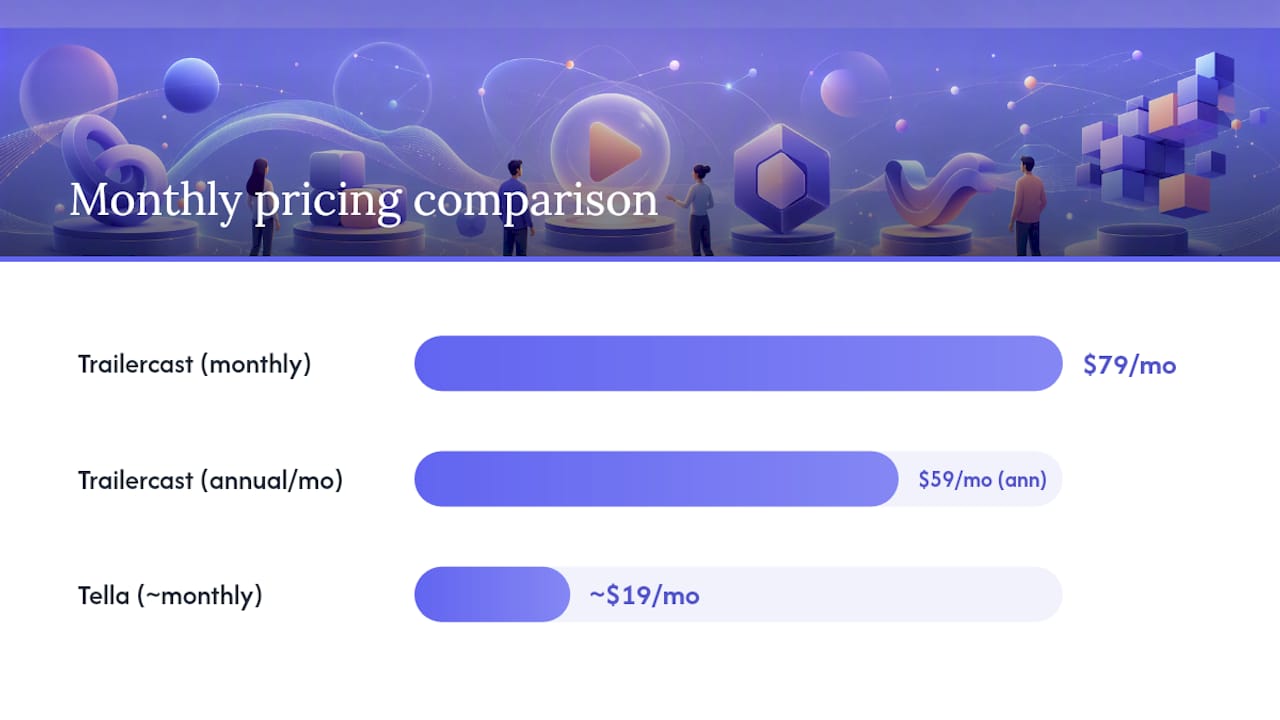
| Tool | Best for | Recording | Editing | Hosting & privacy | Team & analytics | Integrations | AI features | Pricing | Loom migration |
|---|---|---|---|---|---|---|---|---|---|
| Trailercast | B2B sales / multi-stakeholder deals | Screen + webcam, browser recording, cloud | AI moment detection, branded trailer assembly | Buyer-facing deal rooms, per-stakeholder tracking | Workspaces, engagement heatmap, per-stakeholder analytics | Zoom, Meet, Teams, Google/Microsoft calendar | Transcripts, summaries, deal briefs, auto-trailer, AI assistant (Winter) | $79/seat/mo or $59 annual; free trial | — |
| Tella | Creators, product teams | Screen + webcam, browser-based, cloud | Trim, auto-layouts, templates | Hosted links, password protection, embeds | Team workspaces, viewer counts | Notion, Slack | Basic transcripts | Free tier (limited); paid from ~$19/mo | Documented migration path |
| Descript | Content and training teams | Screen + webcam, local + cloud | Text-based editing, multitrack, Studio Sound, filler-word removal | Hosted links, embeds | Comments, team projects | Zoom, Slack, Google Drive | Transcripts, chapters, AI edits | Free tier (1 hr transcription); paid tiers available | Manual import |
| Vidyard | Sales reps, revenue teams | Screen + webcam, cloud | Basic trim | Hosted links, password, custom domain | Viewer analytics, CRM attribution | Salesforce, HubSpot, Gmail, Slack, LinkedIn | Transcripts, summaries, viewer heatmaps | Free tier (limited videos); paid tiers available | Manual import |
| VEED.io | In-browser editing, social repurposing | Screen + webcam, browser-based, cloud | Subtitles, captions, trim, social cutdowns | Hosted links, embeds | Team workspaces | Slack, Zapier | AI subtitles, auto-captions, text-to-speech | Free tier (watermark); paid from $18/mo | Manual import |
| OBS Studio | Power users, privacy-first teams | Screen + webcam, local only | Scene switching, basic mixing | No hosting (local files only) | None | Streaming platforms, plugins | None native | Free, open-source | N/A |
| Cap | Data-ownership, Loom-like workflow | Screen + webcam, local + optional cloud | Basic trim | Hosted links (cloud option), self-host | Team workspaces, comments | Slack (via integrations) | Transcripts | Free (open-source); cloud plan available | Loom import supported |
| Camtasia | Training, instructional design | Screen + webcam, local | Full timeline, callouts, quizzes, multitrack | No native hosting | — | PowerPoint, LMS exports | Basic captions | One-time ~$299.99 or subscription | Manual import |
| Screencastify | Educators, quick Chrome captures | Screen + webcam, browser extension, cloud | Basic trim, drawing tools | Hosted links, Google Drive | Google Classroom integration | Google Workspace | Basic transcripts | Free tier (10 min cap); paid from $3/mo | Manual import |
| CloudApp | Support, product feedback | Screen + webcam, GIFs, screenshots, cloud | Annotations, markup | Hosted links, password, embeds | Viewer counts, team spaces | Slack, Jira, Trello, Gmail | — | Free tier (25 items); paid tiers available | Manual import |
A few pricing notes worth flagging: Camtasia’s one-time purchase model can beat subscription tools on total cost over two or three years, a point several 2026 roundups make explicitly. OBS is the only option with no cost at all and no recording caps. Trailercast’s $59/seat/month annual rate covers every feature with no gating, which matters when you’re comparing against tools that lock AI features behind higher tiers.
What does each Loom alternative actually offer?
The shortlist above tells you where to look. Here’s what you’ll find when you get there.
Trailercast
Trailercast is not a screen recorder. It’s an AI sales platform built for the space between calls, where deals either advance or stall. An AI notetaker joins Zoom, Meet, and Teams calls, transcribes speaker-by-speaker, and builds a Deal Brief that evolves across every conversation in the opportunity. From a demo recording, the AI picks the 8–15 minutes that mattered and assembles a branded trailer with intro, agenda, and outro slides. Trailers can be personalized per stakeholder: a CFO version that leads with pricing, a CISO version that leads with security.
Those trailers live inside buyer-facing Decision Rooms, one per deal, where the buying committee can review materials, ask questions, and sign. Embedded eSignature closes the deal in-app. When the contract signs, an AI Handoff Brief fires to Customer Success automatically.
Strengths:
- Full deal lifecycle in one workspace: calls, demos, deal rooms, eSignature, handoff
- Per-stakeholder trailer personalization with voice cloning (15+ languages)
- Engagement heatmap and attribution tree showing who shared with whom
- AI assistant (Winter) that reads live call transcripts and deal data
Watch-outs:
- Not a general-purpose screen recorder; if you need quick async updates for internal teams, lighter tools are faster to spin up
- Pricing at $79/seat/month (or $59 annual) is higher than standalone recorders, though it replaces five separate tools
Pricing: $79/seat/month or $59/seat/month billed annually. Free trial, no credit card required.
Tella
Tella is the closest thing to a direct Loom replacement for creators and product teams. It’s browser-based, records screen and webcam simultaneously, and applies auto-layouts and templates that make recordings look polished without any post-production. The migration story is one of its genuine differentiators: Tella documents a clear path for teams switching from Loom, including import workflows.
Strengths:
- Auto-layouts and branded templates out of the box
- Clean, fast browser-based recording with no install
- Documented Loom migration path
Watch-outs:
- AI features are more limited than Descript or Vidyard
- Free tier has usage caps; check limits before committing a team workflow
Descript
Descript’s core idea is simple and genuinely different: the transcript is the timeline. You delete a word from the transcript and the video cuts. You fix a filler word in the text and it’s gone from the audio. Studio Sound cleans up background noise in one click. For teams that repurpose recordings into training videos, product walkthroughs, or social clips, Descript is the most capable editor on this list.
Strengths:
- Text-based editing is faster than timeline scrubbing for spoken content
- Filler-word removal and Studio Sound audio cleanup
- Multitrack editing for interviews and panel recordings
Watch-outs:
- Steeper learning curve than Loom or Tella for simple async updates
- Free tier limits transcription to 1 hour total
Vidyard
Vidyard is built for sales reps who want to know what happens after they hit send. Viewer analytics show who watched, how far they got, and whether they rewatched specific sections. CRM integrations with Salesforce and HubSpot log that activity directly to the contact record. For outbound prospecting and follow-up sequences, that attribution is the whole point.
Strengths:
- Viewer heatmaps and per-contact watch data
- Native Salesforce, HubSpot, Gmail, and LinkedIn integrations
- Solid free tier for individual reps
Watch-outs:
- Editing is basic; not the right tool for polished training content
- Team analytics and CRM sync sit behind paid tiers
VEED.io
VEED.io lives entirely in the browser and covers the gap between raw recording and social-ready output. AI subtitles generate automatically, captions are customizable, and the social repurposing tools let you cut a 30-second clip from a longer recording without touching a desktop editor. For marketing teams that need to turn internal demos into LinkedIn posts or product updates, it’s a practical choice.
Strengths:
- AI subtitle and caption generation in the browser
- Social cutdown tools for repurposing longer recordings
- No install required
Watch-outs:
- Free tier adds a watermark; paid plans start at $18/month
- Not designed for deep sales workflows or CRM integration
OBS Studio
OBS is free, open-source, and has no recording caps whatsoever. It captures screen, webcam, and audio with full control over scenes, sources, and output formats. The plugin ecosystem extends it significantly. What it doesn’t have is cloud hosting, viewer analytics, or any AI layer. You record locally, then distribute however you choose.
Strengths:
- Completely free, no watermarks, no time limits
- Cross-platform (Windows, Mac, Linux)
- Extensible via plugins
Watch-outs:
- No built-in hosting or sharing; you manage distribution yourself
- Setup takes time; not a quick-start tool for non-technical users
Cap
Cap is an open-source Loom-like recorder that supports local recording, self-hosting, transcripts, and team workspaces. Its Loom import support is a practical differentiator for teams migrating at scale. You can run it entirely on your own infrastructure, which matters for organizations with strict data residency requirements.
Strengths:
- Self-hosting option for full data ownership
- Loom import supported
- Free and open-source
Watch-outs:
- Cloud sharing and turnkey analytics require the cloud plan
- Smaller community and support resources than commercial tools
Camtasia
Camtasia is a desktop application first. It records screen and webcam locally and opens into a full timeline editor with callouts, annotations, quizzes, and multi-track audio. For instructional designers building structured training courses, it’s the most complete tool on this list. The one-time purchase option makes it cost-effective over a multi-year horizon compared to monthly subscriptions.
Strengths:
- Full-featured timeline editor with callouts and quizzes
- One-time purchase available (~$299.99)
- Strong LMS export options
Watch-outs:
- No native cloud hosting; you export and host elsewhere
- Heavier software; not suited for quick async updates
Screencastify
Screencastify is a Chrome extension that records directly in the browser and saves to Google Drive. It’s designed for speed and simplicity, and its Google Classroom integration makes it the default choice for educators. The free tier caps recordings at 10 minutes, which covers most classroom use cases.
Strengths:
- Zero-install Chrome extension
- Google Workspace and Classroom integration
- Paid plans start at $3/month
Watch-outs:
- Chrome-only; no desktop app or other browser support
- Limited editing beyond basic trim and drawing tools
CloudApp
CloudApp handles the fastest end of the capture spectrum: annotated screenshots, GIFs, and short video clips that go from capture to shareable link in seconds. Annotation tools make it useful for support teams flagging UI issues or product teams giving quick visual feedback. It’s not a video messaging platform in the Loom sense, but for teams that mostly share screenshots and short clips, it’s faster than anything else here.
Strengths:
- Fastest capture-to-link workflow on the list
- Annotation and markup tools built in
- Integrates with Slack, Jira, Trello, and Gmail
Watch-outs:
- Free tier caps at 25 items
- Not suited for longer recordings or structured video content
Pro Tip: For teams evaluating multiple tools at once, run a 7–14 day side-by-side pilot with two finalists rather than testing sequentially. Parallel testing surfaces integration gaps and sharing UX issues that only appear in real workflows.
How do you pick the right Loom alternative for your team?
The best choice depends on the job you’re hiring the tool for, not on feature checklists alone. Here’s a practical framework.
Start with the primary job
- Async internal updates — (replacing Slack walls of text): Tella or VEED.io. Both are fast to record and look polished without editing time.
Questions to ask vendors during trials
- “Can you import my Loom library, and how long does it take?”
- “How are transcripts stored, and who can access them?”
- “Do you support SSO and SCIM provisioning?”
- “What happens to my data if I cancel?”
- “Is there a watermark on any plan, and where does it appear?”
Red flags to watch for
- No data export or library download option
- Watermarks that only appear after you’ve shared a video externally
- Transcript accuracy below 90% on standard American English
- Team controls (workspaces, permissions, admin roles) locked behind the highest tier
- No SLA or documented uptime history
Pro Tip: Ask every vendor for a list of their current integrations, not their roadmap integrations. “Coming soon” Salesforce sync is not the same as a live native connector.
When does Trailercast beat a general-purpose Loom replacement?
Most Loom alternatives solve one problem: they record and share video. Trailercast solves a different problem: the deal dies in an internal meeting you weren’t part of, and no screen recorder fixes that.
Three scenarios where Trailercast is the right call:
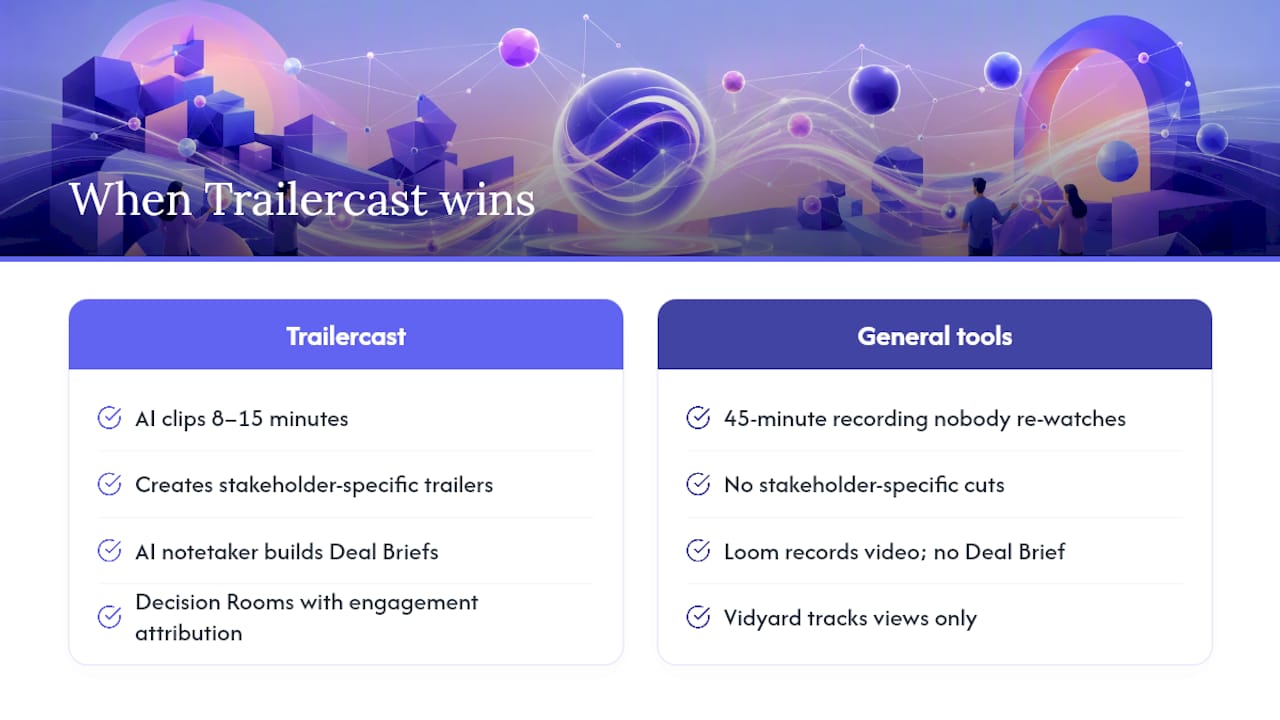
Scenario 1: Multi-stakeholder B2B deals. Your champion loved the demo. Now they need to sell it internally to a CFO, a CISO, and a procurement lead who weren’t on the call. A Loom recording is a 45-minute video nobody will rewatch. Trailercast’s AI clips the 8–15 minutes that mattered, assembles a branded trailer, and lets you create a CFO-specific version that leads with pricing and a CISO-specific version that leads with security. Your champion has something worth forwarding.
Scenario 2: Discovery call capture tied to pipeline. You need structured summaries, qualification verdicts, and action items from every discovery call, automatically routed into the right deal. Trailercast’s AI notetaker for discovery calls does that. Loom records a video. Vidyard tracks whether someone watched it. Neither builds a Deal Brief that spans every call in the opportunity.
Scenario 3: Post-demo follow-up with engagement tracking. You want to know which stakeholders engaged with your materials, how long they spent on the pricing section, and whether your champion forwarded the deck to someone new. Trailercast’s Decision Rooms track all of that with an attribution tree. Vidyard tracks video views. The gap between those two is the gap between knowing a prospect watched your video and knowing your deal is moving.
General-purpose tools still make sense for internal async updates, quick screen shares, and training content. If you’re a sales team running multi-stakeholder deals, the consolidation argument for Trailercast is straightforward: conversation intelligence, demo trailers, and deal rooms in one workspace, instead of Gong plus Loom plus Dock plus DocuSign.
Pro Tip: Sales teams piloting Trailercast should start with one active deal, not a full team rollout. Build one Decision Room, generate one trailer, and watch what the engagement data tells you before expanding.
Key Takeaways
The right Loom replacement is the one that matches the job: sales teams with multi-stakeholder deals need Trailercast; teams that need free unlimited capture need OBS; transcript-first editing points to Descript; and polished async demos point to Tella or VEED.io.
| Point | Details |
|---|---|
| Job-first selection | Match the tool to the workflow: async updates, training, sales enablement, or broadcast capture each point to a different option. |
| Free-tier watch-outs | Loom’s free plan caps at 5 minutes and 25 videos; several alternatives have similar or stricter limits. Verify before building a team workflow. |
| Migration timing | Export your Loom library before canceling. Cap and Tella offer documented import paths; most others require manual re-upload. |
| Sales teams need more than a recorder | Vidyard tracks video views; Trailercast tracks per-stakeholder deal engagement, generates AI demo trailers, and hosts buyer-facing decision rooms. |
| Trailercast for B2B sales | Trailercast consolidates conversation intelligence, AI-edited demo trailers, deal rooms, eSignature, and post-close handoff at $59/seat/month billed annually. |
Why Trailercast is the pick for sales teams, not just a video tool
Here’s the honest version: most of the tools on this list are excellent at what they do. OBS is genuinely the best free recorder. Descript’s text-based editing is a real productivity gain for content teams. Tella is the smoothest Loom replacement for creators.
But when I look at what actually breaks down in B2B sales, it’s never the recording quality. It’s what happens after the demo. The champion walks back into their organization with a great memory of the call and a PDF they’re expected to re-sell from. The CFO wasn’t there. The CISO has questions nobody answered. The deal stalls.
A screen recorder doesn’t fix that. Neither does a video messaging tool that tells you someone watched 80% of your clip. What fixes it is giving your champion something they can actually use to sell internally: a short, personalized trailer that speaks to each stakeholder’s specific concern, living inside a deal room where the whole buying committee can engage, ask questions, and eventually sign.
That’s a different category of tool. It’s not better than Descript for editing or better than OBS for free capture. It’s better for the specific problem of keeping a multi-stakeholder deal alive between conversations. For RevOps leaders evaluating their stack, the consolidation math is worth running: Trailercast at $59/seat/month annual replaces Gong (or Fathom), Loom, Dock, and DocuSign in one workspace. Lighter tools still make sense for internal async updates and training. The question is whether your sales team’s biggest problem is recording quality or deal visibility.
Trailercast is built for the space between your calls
Every tool on this list captures what happens on the call. Trailercast owns what happens after it. Your champion gets a personalized, AI-edited trailer they can actually forward to the CFO. Your deal room tracks who engaged with what. Your next call starts with a Deal Brief that spans every conversation in the opportunity, not just the last one.

For B2B sales teams running multi-stakeholder deals, that’s the consolidation worth making. One platform for conversation intelligence, demo trailers, and buyer-facing deal rooms, with embedded eSignature and an AI handoff brief when the contract signs. No credit card required to start. See what Trailercast does, stage by stage, or start your free trial at trailercast.io.
Useful sources and vendor pages
- Best Free Loom Alternatives 2026: 9 Tools Compared
- Best Loom Alternatives in 2026: Free and Paid Options for Every Use Case | Qualtir Blog
- 8 Loom Alternatives We Tested (2026) | ngram.com
- How To Choose The Best Loom Alternative In 2026 [Top 20 Reviewed]
- Cap
- Loom Alternatives & Competitors
- Loom — SaaSCompared product page
- TrailerCast Features | The AI Sales Platform, Stage by Stage