3 Copyable Call Recap Email Templates for Sales Reps That Close Deals

Send a short recap soon after hanging up, and lead with next steps in this exact order: Task — Owner — Due date. Put a clear subject line up top, name the next meeting date (or flag it “TBD” with an owner to schedule it), and bold every action item so a scanning CFO can find their part quickly. That single habit can greatly improve your close rate.
TL;DR:
- Sending a call recap within two hours significantly increases follow-through, with the optimal window being under 2 hours, especially for high-stakes calls.
- Recaps should clearly state decisions as completed outcomes, list action items in a consistent format, and include supporting documents to ensure clarity and accountability.
- Using specific subject line patterns and keeping the email between 150 and 300 words improves open rates and reader comprehension.
- Immediate CRM logging, attaching call recordings, and scheduling next meetings right after sending the recap ensure the deal stays organized and momentum isn’t lost.
- Automating recaps with AI tools like TrailerCast can save multiple hours per week by drafting structured summaries directly from call transcripts.
Table of Contents
- What Goes Into a Call Recap Email, at Minimum?
- When Should You Send a Call Recap Email?
- What to Include: Decisions, Action Items, and Attachments
- Three Call Recap Templates You Can Copy Right Now
- How Long Should a Recap Email Be?
- What Should You Do After You Hit Send?
- How AI Tools Are Shortening the Recap Loop
- Why Contact Information Belongs in Every Recap
- The One Recap Habit Worth Building
- A Faster Way to Get From Call to Recap
- Sources
- FAQ
What Goes Into a Call Recap Email, at Minimum?
A call recap email earns its name by carrying six things and nothing extra. Skip one and you’ve written a thank-you note, not a recap.
Here’s the compact version you can build from every time:
- Subject line: something searchable and specific, like “Recap: Acme x [Your Company], March 12” or “Next steps: Acme demo follow-up”
- Attendees: first and last names, with titles if the group was mixed (buyer + technical + finance)
- One-sentence purpose: what the call was actually for, stated plainly
- Decisions (three bullets max): what got agreed, not what got discussed
- Action items: formatted as Task — Owner — Due date, every time, no exceptions
- Next meeting: a date, or “TBD” with a named owner responsible for scheduling it
That’s the whole skeleton. HubSpot’s recap templates note that confirming the next meeting’s date and time measurably cuts down on ghosting, because the prospect now has something concrete on their calendar instead of a vague promise to “circle back.” The Owll backs the same five core sections, plus a specific timing rule we’ll get to next.
Everything past this six-piece core is optional garnish. A paragraph of context is fine if the deal is complex, but the checklist above is what a recipient actually reads before deciding whether to reply.
When Should You Send a Call Recap Email?
Speed is the single biggest lever you control after a call ends, and it costs you nothing but ten minutes of typing.
Send within two hours whenever you can manage it. Same day is the floor for anything that matters. Otter recommends same-day or same-hour sends specifically for high-stakes calls, because momentum decays fast once a prospect moves on to their next meeting. Owll.ai’s research puts a number on it: a 2-hour send window produces meaningfully better follow-through than waiting until end of day. Indeed’s meeting recap guidance sets 24 hours as the outer limit, acceptable but not ideal.
Statistic Callout: Recaps sent within 2 hours of a call get better follow-through than those sent later the same day, according to Owll.ai. Waiting until tomorrow morning is where deals start losing altitude.
Your subject line does real work here too. A few patterns that consistently get opened:
- “Recap: [Company] x [Your Company], [Date]” — clean, searchable, easy to find later
- “Next steps: [Prospect] + [Your Company]” — signals action before the email is even opened
- “Action required: [specific task] by [date]” — reserve this for when something is genuinely time-sensitive
Keep it under 50 characters where you can. Most of your prospects are reading on a phone between meetings, and a subject line that gets cut off mid-word loses its urgency. Skip “Action required” unless there’s a real deadline attached. Overuse it once and your prospect starts ignoring it.
What to Include: Decisions, Action Items, and Attachments
The difference between a recap that gets acted on and one that gets skimmed and forgotten comes down to how you phrase each line, not how much detail you cram in.
Write decisions as completed outcomes, not conversation topics. “We discussed pricing” tells the reader nothing. “Approved a 20-seat pilot starting April 1” tells them exactly what happened and what’s locked in. This single rewrite, drawn from Otter.ai’s recap framework, is the fastest way to make a recap feel decisive instead of vague.
Here’s the sequence that works for structuring the body:
- State the decisions first, each as a finished sentence, capped at three bullets so nothing gets buried.
- List action items in a consistent format: verb-first task, then bold the owner, then bold the due date. Example: “Send security questionnaire — you, by Thursday.”
- Separate open questions and blockers into their own short section so they don’t get confused with committed action items. A question isn’t a task yet.
- Attach or link supporting documents, and say what each one is in a half sentence. “Attached: pricing proposal for the 20-seat tier” beats a bare file name every time.
- Decide who gets CC’d. Loop in a manager or economic buyer only when the recap references a decision they need to ratify or a budget they control. CC’ing everyone by default trains people to skim.
Indeed’s format guidance confirms that bolding the owner and deadline on each action item measurably improves scannability, because the reader’s eye catches the two things that matter without reading the whole sentence.
Pro Tip: Use the exact same action-item format every single time, across every deal. When your prospects and your own team see “Task — Owner — Due date” consistently, they stop having to parse your emails and start just acting on them.
One more thing worth naming: open questions are not failures. A recap that says “Still need clarity on your data residency requirements” is more useful than one that pretends the call answered everything. It also gives your prospect an easy, specific thing to respond to, which beats a recap that only invites a generic “sounds good.”
Three Call Recap Templates You Can Copy Right Now
Different calls need different recaps. A discovery call recap and a demo recap are not the same document wearing different clothes, and treating them that way is why so many reps write one generic template and wonder why it underperforms.
Discovery call recap
Subject: Recap: [Prospect Company] x [Your Company], [Date]
Hi [Name],
Good talking today. Quick recap so we’re aligned:
Purpose: Understand [Prospect Company]'s current process for [specific pain point].
What we learned: [One or two sentences on their stated challenge.]
Next steps:
- Send case study on [relevant use case] — [Your Name], by [date]
- Confirm technical stakeholders for demo — [Prospect Name], by [date]
Next meeting: [Date/time] or TBD, owner: [Name]
Let me know if I’ve missed anything.
Demo recap
This one should highlight two to four features tied directly to what the buying committee cares about, not a full feature tour. If your CISO was on the call, lead with security. If your CFO was there, lead with ROI.
Subject: Recap: [Company] Demo, [Date]
Hi [Name],
Thanks for the time today. Here’s what stood out based on what your team flagged:
- [Feature 1] → solves [specific stated problem]
- [Feature 2] → relevant to [stakeholder]'s requirement around [topic]
Next steps:
- Share pricing proposal for [tier] — [Your Name], by [date]
- Loop in [stakeholder] for security review — [Prospect Name], by [date]
Next meeting: [Date/time]
Objection-handling recap
This template’s job is to show the prospect their concern was actually heard, answer it directly in writing, and then move the deal forward instead of letting the objection sit unresolved.
Subject: Recap: [Company] Follow-Up, [Date]
Hi [Name],
Appreciate you being direct about [the objection] today. To recap how we addressed it:
Concern raised: [State it plainly, in their words.]
Our answer: [One or two sentences, specific, no fluff.]
Next steps:
- Send reference customer contact who faced the same concern — [Your Name], by [date]
- Confirm revised timeline — [Prospect Name], by [date]
Next meeting: [Date/time] or TBD
HubSpot’s recap template library covers similar scenario-based structures for connect, discovery, and demo calls, and it’s worth cross-referencing if you handle a wider variety of call types. Fill in every bracket before sending. A template with visible placeholders left in it reads as careless, and that’s the opposite of what a recap is supposed to signal.
How Long Should a Recap Email Be?
Aim for 150 to 300 words, full stop. That’s the range Indeed’s guidance recommends, and it holds up because anything longer starts burying the action items under paragraphs nobody scrolls through.
Structure it the same way every time: one line stating the purpose, then bullets for decisions and action items, then a short closing line that invites a reply or confirms the next meeting.
- Match your tone to the prospect’s own emails. If they write short and casual, don’t send back a formal wall of text.
- Default to concise and professional when you’re unsure. Warmth without slack is the target.
- Break up anything longer than four lines with bullets. A wall of prose on a phone screen doesn’t get read, it gets archived.
Pro Tip: Read your draft on your own phone before you hit send. If you have to pinch-zoom or scroll past the fold to see your action items, your prospect will too, and they won’t bother.
What Should You Do After You Hit Send?
The email itself is only half the job. What happens in your CRM in the next ten minutes decides whether the deal stays organized or starts slipping through cracks.
- Log a short CRM note immediately, pasting the action items directly into the activity record so anyone on your team can see deal status without re-reading the whole email thread.
- Attach the recap itself, plus the call recording or transcript, to that CRM activity. If a manager needs context in three weeks, it should take them ten seconds to find, not a search through old emails.
- Create the calendar invite for the next meeting right away. If the date is still TBD, assign a named owner to lock it down within a set number of days, don’t leave it floating.
- Set a soft follow-up reminder for three business days out. If there’s no reply by then, a short one-line nudge (“Just floating this back up, any questions on the next steps below?”) is enough. Don’t rewrite the whole recap.
Granola’s workflow guide recommends capturing minimal notes live during the call and converting them into structured bullets immediately after, which keeps draft time under a few minutes instead of stretching into a twenty-minute writing session an hour later when details have already gone fuzzy.
How AI Tools Are Shortening the Recap Loop
Manually typing every recap eats time you could spend on the next call, and it’s where accuracy slips when you’re tired at 6 PM after five demos back to back. An AI workflow that sits on top of your calls, drafting a structured summary the moment you hang up, removes that entire step instead of just speeding it up.
TrailerCast is built around exactly this gap. Its AI notetaker for discovery calls auto-generates structured summaries, talk-time breakdowns, and action items straight from the call transcript, so the draft is mostly done before you’ve closed your laptop. Beyond the email itself, a decision room keeps next steps visible to the whole buying committee between calls, tracking who forwarded what to whom, which solves the problem of a recap getting buried in one champion’s inbox instead of reaching the CFO who wasn’t on the call.
Fewer missed action items, faster sends, and a cleaner handoff to Customer Success when the deal closes. This kind of automation covered in more detail in guides on AI productivity workflows is becoming standard practice for reps who send a dozen recaps a week.
Why Contact Information Belongs in Every Recap
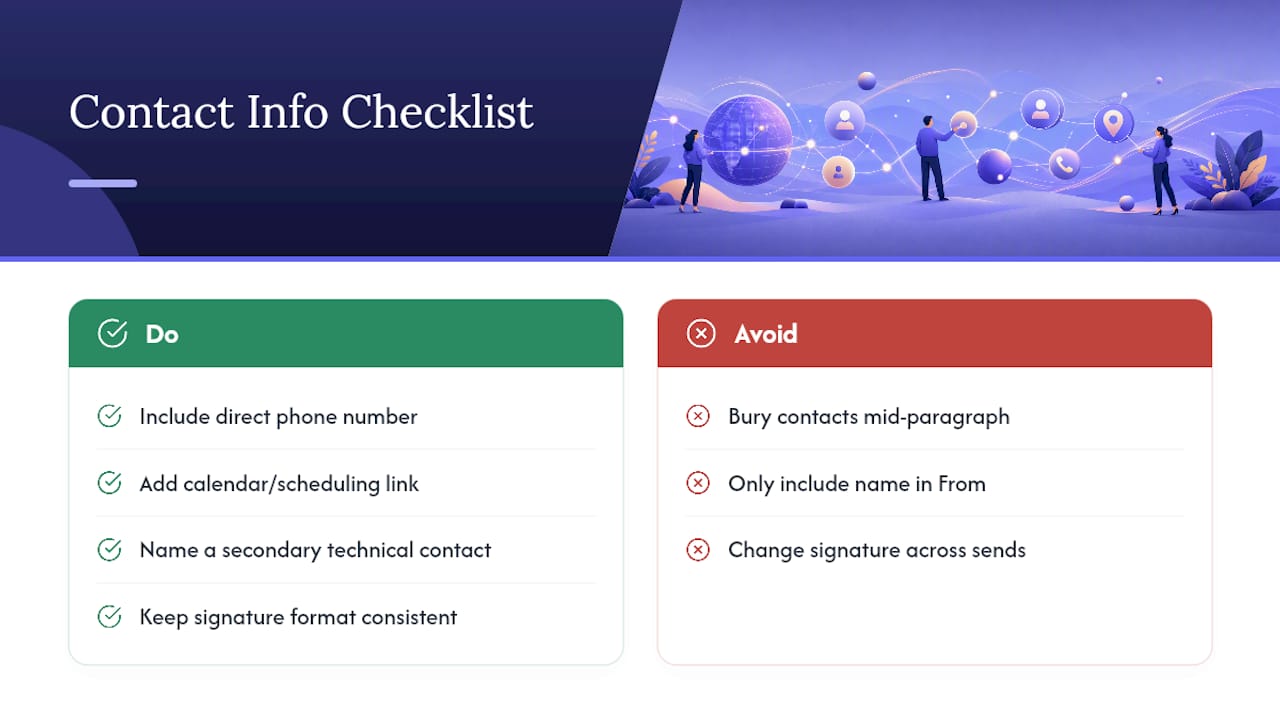
A recap without a clear way to reach you back is a dead end dressed up as a follow-up. Prospects forward these emails internally more often than reps assume, especially to stakeholders who weren’t on the call, and a recap that only has your name in the “From” field gives that new reader nothing to act on.
Put your direct phone number and a scheduling link in your signature block, not buried mid-paragraph. If the deal involves a technical stakeholder or a security reviewer who might need to loop in separately, name a secondary contact (a solutions engineer, a specialist) with their own contact line, so the prospect isn’t stuck routing every question through you as a bottleneck.
Keep it consistent across every recap you send in a single deal cycle. If your signature changes format from email to email, or you drop your phone number on some sends and not others, it reads as inconsistent, and that’s a small thing that erodes trust in a deal where trust is the entire currency. A calendar link for booking the next meeting directly, sitting right next to your contact details, removes an entire round-trip of “does Tuesday work?” emails.
The goal is simple: anyone who opens this email, whether it’s the person you talked to or someone they forwarded it to, should know exactly how to reach you without hunting.
The One Recap Habit Worth Building
The reps who close more consistently aren’t smarter or better talkers. They just send a recap after every single call, not just the “important” ones. My bar: if you talked, you recap, even a two-line version.
Make it part of how you end a call, not a task you get to later. Close your laptop, write the recap, then move on. Reps who treat this as optional lose deals quietly, in meetings they weren’t in.
— Daniel
A Faster Way to Get From Call to Recap
If you’re tired of losing twenty minutes after every call to manual note taking, TrailerCast is built to cut that time down to almost nothing. It auto-drafts structured call summaries and action items the moment a call ends, and keeps every next step visible inside a shared decision room so nothing gets stuck in one inbox waiting for a forward that never happens.

Instead of writing your recap from scratch, you’re editing an already-organized draft, one that pulls straight from the actual transcript instead of your rushed memory of what got said. That difference alone tends to save reps hours a week once it’s part of the routine. If you send more than a couple of recaps a day, it’s worth seeing how the workflow fits your calls. Start with a Trailercast and see your first auto-drafted recap after your very next call.
Sources
- 5 Recap Email Templates to Use After Connect, Discovery, and Demo Calls
- Otter
- How to Write a Meeting Recap Email (With Template)
- Indeed
FAQ
How Do You Write a Good Recap Email?
Lead with next steps in a Task — Owner — Due date format, keep decisions stated as completed outcomes, and send it within a few hours of the call while the details are still fresh.
How Do You Write a Callout Email?
If you mean an email that flags urgent action, use a subject line like “Action required: [task] by [date]” and put the deadline in the first line, not buried in the body.
How Do You Write an Email Confirming a Phone Conversation?
State the date and purpose of the call in one sentence, list what was agreed, and confirm any next meeting date so both sides have the same written record to refer back to.
What Should You Include in a Follow-Up Email After a Phone Call?
Include a clear subject line, the attendees, key decisions, action items with owners and deadlines, and the date of the next meeting or a named owner to schedule it. Tools like TrailerCast can auto-draft most of this directly from the call recording.
How Soon Should You Send a Recap After a Sales Call?
Within two hours is ideal, and same day is the practical minimum. Waiting past 24 hours noticeably increases the odds the prospect has moved on to other priorities.