Three Essentials for AI Sales Pipeline Analysis for RevOps

AI sales pipeline analysis spots at-risk deals, prioritizes which ones need attention this week, and tightens forecast accuracy once your CRM data and stage definitions are clean. It cannot replace a rep’s judgment in a hard negotiation or make the final call on a commit number. Before any of it works, you need three things in place: clean CRM data, agreed-upon stage definitions, and someone whose job it is to own the system.
TL;DR:
- AI analysis relies on clean, unified CRM data with consistent stage definitions and proper governance to deliver reliable insights.
- Effective AI in sales forecasts separates deal-level risk signals from revenue forecasts, requiring ongoing calibration at multiple levels.
- Pilot projects should focus on one segment for 6 to 12 weeks, emphasizing integration into existing workflows and clear ownership for best adoption.
- AI use cases vary by pipeline stage, from enrichment and scoring in prospecting to risk flags and handoff summaries at closing, tailored to each phase.
- Platforms like Trailercast provide an integrated deal lifecycle workspace, but ongoing data quality and stakeholder engagement are essential for success.
Table of Contents
- Where AI in Sales Pipeline Analysis Stands Today
- Data and Process Prerequisites for Reliable AI Analysis
- Metrics and Deal-Level Signals to Analyze With AI
- Concrete AI Use Cases by Pipeline Stage
- Practical Implementation Steps and Rollout Checklist
- How to Measure AI Impact and Validate Forecasts
- Publisher Expertise and Platform Capabilities
- Data Quality and Unified CRM Data
- Mapping Pipeline Stages and Bottleneck Identification
- Common Challenges and Limitations of AI in Sales Pipeline Analysis
- Best Practices for Integrating AI Tools With Existing Sales Processes
- Data Privacy and Ethical Considerations When Using AI in Sales Pipeline Analysis
- A Short RevOps-First 90-Day Plan
- How Trailercast Maps to This Playbook
- Sources
- FAQ
Where AI in Sales Pipeline Analysis Stands Today
Sales teams stopped debating whether AI belongs in the pipeline a while ago. The question now is whether it’s wired into anything useful. According to Salesforce’s State of Sales report, 87% of sales teams already use some form of AI, and 94% of sales leaders running AI agents call them critical to hitting growth targets. That’s not early-adopter territory anymore. That’s the baseline.
By the numbers: 87% of sales teams report using AI in some form, and 94% of leaders with AI agents deployed say those agents are essential to growth, according to Salesforce’s 2026 State of Sales report.
The value cases showing up repeatedly across teams that got this right fall into three buckets. Reps get hours back on prospecting because enrichment and lead scoring happen automatically instead of manually. Pipeline coverage improves because AI flags gaps before they become quarter-end surprises. Forecasts update faster because the system pulls signal from calls and CRM activity instead of waiting for a rep to update a field on Friday afternoon.
Then there’s the other half of the story: the failure modes. Most of them trace back to the same root cause. Teams bolt an AI tool onto a pipeline that’s already a mess. Data lives in five different systems that don’t talk to each other. Stage definitions mean something different to every rep. Nobody owns the system once it’s live, so it drifts, and within two quarters the outputs are noise.
McKinsey’s research on generative AI in B2B sales makes a point worth repeating here: standalone chatbots bolted onto a sales stack rarely move numbers. The value shows up when AI is connected to live CRM data and conversation context, not when it’s another browser tab reps have to remember to check. That distinction explains most of the gap between teams that report real uplift and teams that bought a tool and got a dashboard nobody opens.
Data and Process Prerequisites for Reliable AI Analysis
Every AI pipeline model is only as good as what feeds it. Garbage in, confident-sounding garbage out, and confident garbage is more dangerous than an honest “we don’t know” because it gets trusted.
Four data sources make up the foundation of any credible AI sales pipeline analysis:
- CRM opportunity records — close date, stage, amount, and owner, all current and consistently formatted.
- Activity logs — emails, calls, and meeting history tied to the right opportunity, not floating unlinked.
- Transcript text — call and demo recordings converted to searchable text, not just audio sitting in a folder.
- Procurement and contract metadata — timelines, redline history, and signature status for deals in late stage.
Most teams don’t have this in usable shape on day one. The fixes are unglamorous but non-negotiable: dedupe account records so the same company isn’t split across four IDs, canonicalize account names so “Acme Corp” and “Acme Corporation” resolve to one entity, enforce a single stage definition every rep uses the same way, and standardize date fields so “expected close” means the same thing across every deal in the system.
Governance is the part teams skip, and it’s the part that determines whether the system survives contact with a messy quarter. You need a named data owner, not a committee. You need access controls that separate who can edit stage and amount from who can only view. You need a canonical definitions document, one page, that spells out exactly what “qualified” and “committed” mean so a new rep and a five-year veteran score a deal the same way. And you need privacy controls around any PII that shows up in transcripts or notes, because call recordings pick up more personal information than most teams realize.
Salesforce’s reporting on tool sprawl backs this up directly: teams running unified data on a simplified stack see materially better AI outcomes than teams stitching together five disconnected tools where data gets stuck in silos.
Pro Tip: Run a one-week data audit before you evaluate any AI vendor. Pull 50 random opportunities and check whether close date, stage, and amount are filled in consistently. If more than a handful are wrong or stale, fix that first. No model can compensate for a stage field nobody trusts.
Metrics and Deal-Level Signals to Analyze With AI
Two different questions get conflated constantly in RevOps conversations, and separating them is where most of the analytical value lives. One is “which deals are at risk?” The other is “will we hit the number this quarter?” A model can be excellent at the first and still fail at the second.
Start with the metrics that describe pipeline health at the aggregate level:
- Pipeline coverage ratio — total pipeline value divided by the remaining quota, typically tracked at 3x to 4x depending on your sales cycle length.
- Conversion rate by stage — the percentage of deals that move from one stage to the next, which tells you exactly where deals stall.
- Average deal velocity — days spent in each stage, flagged when a deal sits well past the median for its segment.
- Win rate — closed-won divided by total closed opportunities, segmented by rep, product line, and deal size.
- Forecast error, often measured with MAPE (mean absolute percentage error), comparing what the team committed to what actually closed.
Below the aggregate numbers sit the deal-level signals that actually predict trouble weeks before a deal slips. A deal with no confirmed next step is a red flag regardless of stage. Missing stakeholder coverage, meaning only one contact has engaged and no economic buyer has shown up in a call or email thread, is another. A visible drop in engagement, documents sitting unopened, a demo trailer that got shared but never watched past the first two minutes, tells you the champion may be losing internal momentum. Negotiation delays that stretch past the deal’s historical median velocity are a signal worth surfacing automatically rather than waiting for a rep to notice.
By the numbers: IBM’s research on forecast accuracy makes clear that deal-level risk ranking and revenue-level forecast accuracy are not the same measurement, and treating them as interchangeable is one of the most common mistakes in pipeline analysis.
That IBM finding deserves its own emphasis because it trips up so many teams: a model can correctly flag which individual deals are shaky and still produce a forecast that’s off by a wide margin at the quarter level, because errors that cancel out in aggregate hide inside individual deal-level mistakes. Track calibration separately at four levels, deal, rep, segment, and total revenue, and don’t assume that a well-calibrated deal score automatically produces a well-calibrated quarter number. A structured approach to pipeline metrics makes this separation concrete rather than theoretical.
Concrete AI Use Cases by Pipeline Stage
The right AI use case looks different depending on where a deal sits, and matching the tool to the stage is what separates a useful deployment from a shelf-ware one.
Prospecting. This is where AI does its most mechanical, highest-volume work: enriching account and contact records at a scale no human team could match, generating next-best-account lists ranked by fit and intent, and surfacing intent signals pulled from web activity, job changes, and technographic data. A tactical breakdown of LinkedIn-based intent signals shows how much of this prospecting signal is sitting in public activity data that most teams never systematically capture.
Scoring and prioritization. Hybrid models that blend rule-based logic with machine learning tend to outperform either approach alone, because rules catch known patterns fast while the model catches subtler ones. What matters just as much as accuracy is explainability. A rep who sees a bare number without reasoning will ignore it.
Engagement and outreach. AI-drafted personalization based on transcript and CRM context saves real time on the unglamorous parts of outreach: follow-up emails, meeting recaps, and prioritized call lists for the day. Automated call summaries turn a 45-minute conversation into a structured brief in seconds, and that brief becomes searchable across the whole deal history rather than buried in a recording nobody rewatches. A notetaking system built for discovery calls shows what this looks like when it’s tied directly into the CRM record instead of living in a separate app.
Forecasting and pipeline health. Calibrated probability models, ones tested against actual historical outcomes rather than gut-feel stage percentages, produce far more trustworthy commit numbers. Slippage alerts flag deals drifting past their expected close date before the quarter ends, not after. Scenario modeling lets a RevOps leader stress-test what happens to the number if two large deals slip a quarter, which is a very different exercise than just watching one static forecast line.
Concrete use cases by stage tend to include:
- Prospecting: automated enrichment and next-best-account ranking.
- Scoring: explainable risk and probability outputs tied to specific evidence.
- Outreach: draft personalization and structured call summaries.
- Forecasting: calibrated probability models and slippage alerts.
- Close: contract readiness flags and stakeholder sign-off tracking.
Close and handoff. Contract readiness flags catch the small stuff that stalls signature, missing legal terms, an unresolved redline, a stakeholder who hasn’t confirmed budget approval, before it becomes a last-minute scramble. And the moment a deal signs, an automatically generated handoff brief carrying deal context, the stakeholder map, promised features, and risk flags means Customer Success starts the relationship informed instead of running a discovery call the customer already sat through once with sales.
Practical Implementation Steps and Rollout Checklist
Skip the big-bang rollout. Every credible deployment example starts narrower than teams expect.
- Scope a pilot. Pick one account segment, mid-market renewals or a specific product line, define two or three KPIs up front (forecast error, conversion lift, time-to-next-step), and set a window of 6 to 12 weeks. McKinsey’s guidance on gen AI pilots backs this timeframe as long enough to see real signal without dragging into a permanent “pilot” that never gets evaluated.
- Integrate into the workflow reps already use. The single biggest mistake here is building another dashboard. McKinsey’s research is blunt about this: the highest-leverage AI output is a prioritized work queue, evidence, urgency, owner, recommended action, embedded where the rep already works, not a chart they have to remember to check.
- Assign ownership and SLAs. Decide who receives each flagged deal, how fast they need to act on it, and what “closing the loop” looks like, whether that’s a note back into the system or a status change that feeds the next model update.
- Run change management like a real program. Training on why the model flags what it flags, playbooks for the three or four most common intervention types, and a way to measure whether reps are actually acting on recommendations or quietly ignoring them.
Pro Tip: Measure adoption before you measure impact. If reps aren’t opening the recommended-action queue, no amount of model accuracy will show up in your numbers. Track queue engagement for the first two weeks of any pilot before you even look at conversion data.
Guides on applying generative AI across the full sales lifecycle tend to reinforce the same pattern: the tools that stick are the ones that show up inside a rep’s existing motion, not next to it.
How to Measure AI Impact and Validate Forecasts
Proving that AI moved the number, and not just correlated with a good quarter, takes more discipline than most teams put in.
The core KPIs worth tracking:
- Forecast calibration — do deals predicted at 70% actually close around 70% of the time, checked against a rolling sample.
- Forecast error (MAPE) — the average percentage gap between committed and actual revenue, tracked quarter over quarter.
- Conversion lift — the change in stage-to-stage conversion for deals that received an AI-recommended intervention versus ones that didn’t.
- Time-to-next-step — how quickly a flagged deal gets a follow-up action logged after the alert fires.
The cleanest way to attribute outcomes to the AI system itself, rather than to a generally good quarter, is a cohort or holdout test: run recommendations for one segment and withhold them from a comparable segment, then compare conversion and velocity between the two. McKinsey’s case examples show measurable pipeline and conversion gains from this kind of targeted deployment, and similar transformation work paired with organizational change has produced revenue uplifts in the single-digit to low double-digit percentage range.
By the numbers: Reported ROI improvements from gen AI paired with organizational change generally land in the single-digit to low double-digit percentage range, a useful benchmark for setting realistic pilot expectations rather than promising a moonshot.(https://www.mckinsey.com/industries/chemicals/our-insights/accelerating-chemical-revenues-in-the-era-of-gen-ai), a useful benchmark for setting realistic pilot expectations rather than promising a moonshot.
For cadence, RevOps should review calibration weekly during a pilot and monthly once stable, while GTM leadership reviews aggregate KPIs (coverage, forecast error, conversion lift) at the regular pipeline review, not as a separate AI-specific meeting. Folding it into the existing cadence, rather than creating a parallel reporting track, is what keeps the numbers connected to real decisions instead of becoming a side report nobody acts on.
Publisher Expertise and Platform Capabilities
Daniel has spent years watching B2B deals die in the gap between calls, not in the calls themselves. That’s the lens behind Trailercast: a champion leaves a great demo, walks back to a CFO who wasn’t there, and gets asked to re-sell a deal from memory. Most AI sales tooling ignores that gap entirely and focuses only on the call itself.
Trailercast’s approach ties directly to the prerequisites and use cases covered above:
- A single AI thread follows the entire deal lifecycle, calls, demos, buyer-facing rooms, signature, and handoff, rather than fragmenting each stage into a separate tool.
- Conversation intelligence auto-transcribes and summarizes every call, builds an evolving deal brief, and makes every conversation searchable rather than trapped in an unwatched recording.
- AI-edited demo trailers compress an hour-long demo into the 8 to 15 minutes that actually matter, personalized per stakeholder, so a champion has something worth forwarding instead of a static deck.
- Decision rooms track who forwarded what to whom inside the buying committee, giving RevOps the stakeholder-engagement signal that most pipeline models are missing entirely.
- An automated handoff brief fires to Customer Success the moment a contract signs, carrying deal context, promised features, and risk flags forward instead of letting that information evaporate.
If you’re evaluating any platform for this, insist on a trial period long enough to run a real pilot, not a demo click-through, and measure it against the KPIs already covered here: conversion lift, forecast calibration, and time-to-next-step. Anything less makes it impossible to know if the tool is actually working or just looks good in a sales deck.
Data Quality and Unified CRM Data
Every pipeline metric downstream of the CRM is only as trustworthy as the CRM itself, and this is where most AI pipeline projects quietly fail before they even launch. A model trained on inconsistent stage definitions or duplicate account records doesn’t produce bad predictions. It produces confident predictions that happen to be wrong, which is worse because reps start trusting numbers they shouldn’t.
Unified data means more than one CRM instance. It means activity logs, transcripts, contract metadata, and opportunity records all resolve to the same account and deal identifiers, so the AI system can build one coherent picture of a deal instead of stitching together fragments from five disconnected sources. Salesforce’s reporting found that teams running a simplified, unified stack see measurably better AI outcomes than teams with tool sprawl, largely because the model isn’t fighting inconsistent or missing data at every turn.
The practical fix isn’t glamorous: a quarterly data hygiene review, a single source of truth for account hierarchy, and a rule that no new tool gets added to the stack without a plan for how its data reconciles with the CRM. Skip this step and every subsequent AI investment, scoring, forecasting, or engagement tracking, inherits the same underlying mess.
Mapping Pipeline Stages and Bottleneck Identification
Before AI can flag a bottleneck, you need stages that mean something consistent. Vague stage names like “engaged” or “in discussion” invite every rep to interpret them differently, which corrupts velocity and conversion metrics before the model even sees the data.
A clean stage map defines entry and exit criteria for each stage in concrete, verifiable terms: a deal doesn’t move to “committed” because a rep feels good about it, it moves there because a specific document was signed or a specific stakeholder confirmed budget in writing. Once that’s in place, bottleneck identification becomes straightforward. Look at average time-in-stage against the historical median for that segment, and flag any deal sitting well past it.
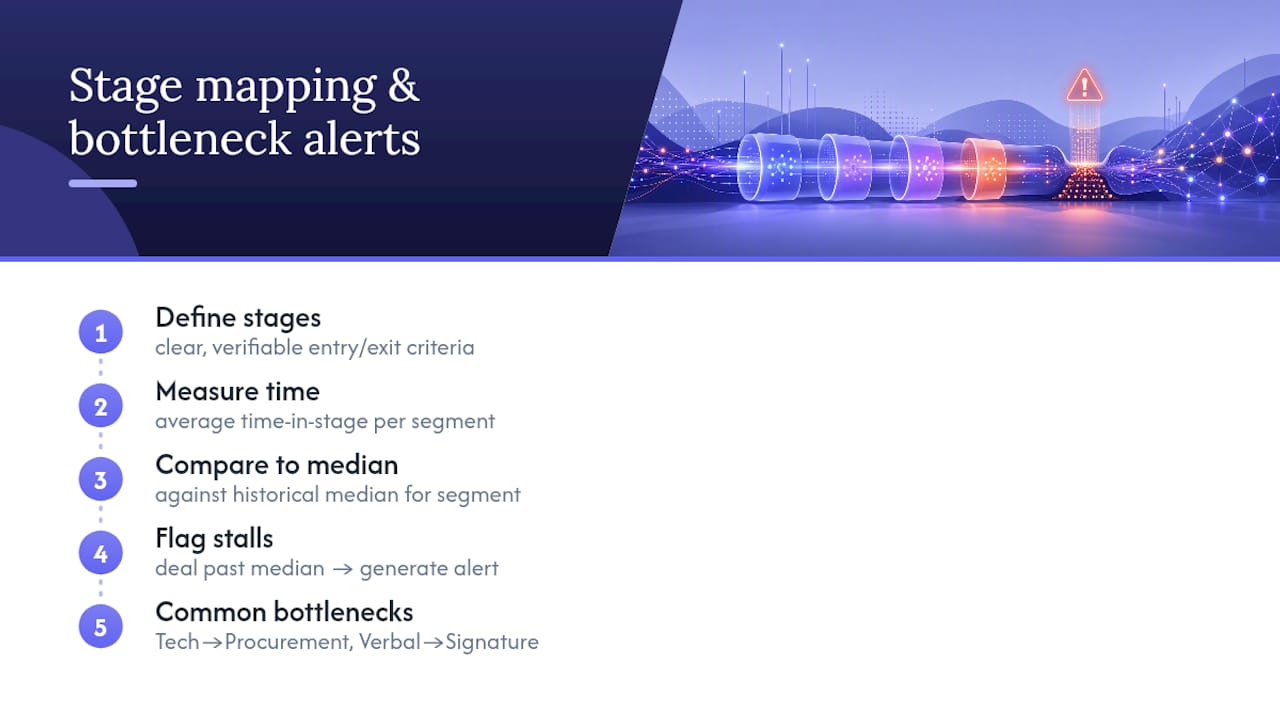
The most common bottlenecks tend to cluster in predictable places: the transition from technical validation to procurement, where legal and security review can stall for weeks, and the gap between verbal commitment and signature, where a deal can quietly die in an internal budget meeting nobody on the sales side was invited to. AI is genuinely useful here because it can flag the stall the day it starts, rather than the week a rep finally notices the deal has gone quiet.
Common Challenges and Limitations of AI in Sales Pipeline Analysis
AI pipeline tools have real limits, and pretending otherwise sets up a rollout for disappointment.
Cold starts are the first hurdle. A brand-new model has no historical pattern to learn from, so early predictions in a new segment or product line will be shakier than the vendor’s demo suggested. Explainability gaps come next: a model that scores a deal at 40% without showing which signals drove that number will get ignored by reps who don’t trust a black box, no matter how accurate it turns out to be over time.
Data drift is a quieter problem. Sales motions change, a new product launches, a competitor shifts pricing, and a model trained on last year’s patterns can start producing stale recommendations without anyone noticing until forecast error creeps up. And no model currently replaces the judgment required in a genuinely complex, multi-stakeholder negotiation. AI can tell you a deal is at risk. It can’t tell you how to handle a CFO who’s playing two vendors against each other for leverage.
The organizational limitation matters just as much as the technical ones. Change management, training reps, building playbooks, getting buy-in, often determines whether a pilot scales more than the underlying model’s accuracy does. A technically excellent model that reps ignore produces zero business value, which is a lesson plenty of teams learn the expensive way.
Best Practices for Integrating AI Tools With Existing Sales Processes
The integration point that matters most is the rep’s actual workflow, not the org chart. If a recommendation requires a rep to leave their CRM and check a separate tool, adoption drops fast regardless of how good the underlying model is.
Start by embedding AI outputs directly into the tools reps already open every day: the CRM opportunity view, the call platform, the deal room. A prioritized action, “call the CFO, engagement dropped 40% this week,” delivered inside the existing workflow gets acted on far more often than the same insight sitting in a separate analytics dashboard.
Pair every AI recommendation with a clear owner and a defined next action. A flagged risk without an assigned response is just noise that trains reps to tune out future alerts. Build a short feedback loop too: when a rep acts on a recommendation and it works (or doesn’t), that outcome should feed back into refining the model, not disappear into a spreadsheet nobody revisits.
Finally, roll out gradually by team or segment rather than organization-wide on day one. A phased rollout gives RevOps room to fix integration issues on a small group before the whole sales floor is depending on a system that’s still being tuned. Guidance on capturing buyer engagement signals as an operational playbook, rather than a one-off report, illustrates what this looks like once it’s actually running.
Data Privacy and Ethical Considerations When Using AI in Sales Pipeline Analysis
Call transcripts and CRM activity logs carry more personal information than most teams account for: names, direct phone numbers, sometimes health or financial details that come up naturally in a sales conversation. Treating that data casually creates real exposure, both legal and reputational.
Start with consent and disclosure. Buyers should know when a call is being recorded and transcribed, and that disclosure needs to be consistent, not left to individual rep discretion. Access controls matter just as much: not every person on a sales team needs to see every transcript or every deal’s full activity history, and role-based permissions should reflect that.
Bias is a real risk in scoring models too. A model trained on historical win patterns can inadvertently learn to deprioritize deals from underrepresented industries or regions if those patterns correlate with past sales team behavior rather than actual deal quality. Explainable scoring, the same feature that builds rep trust, also gives you a way to audit for this kind of bias before it compounds.
Data retention policy needs a clear answer too: how long transcripts and enriched contact data stay in the system, and what happens to that data if a prospect asks for it to be deleted. None of this is a reason to avoid AI pipeline analysis. It’s a reason to build governance into the rollout from day one rather than retrofitting it after a problem surfaces.
A Short RevOps-First 90-Day Plan
If I were starting this from zero, the first 90 days would go entirely to three things: data triage, one measurable pilot, and governance. Not five pilots. Not a full-stack replacement. One segment, two or three KPIs, and a named owner who checks the numbers every week.
The mistake I’d actively avoid is assembling AI tools before the data is ready. A shiny scoring model layered on top of duplicate accounts and inconsistent stage definitions will produce confident, wrong answers faster than a human ever could, and it’ll take months to earn back the trust it burns in week one.
Scaling comes after the pilot proves itself, not before. Take what worked, formalize it into an SLA (who gets which alert, how fast they act), and codify the interventions that actually moved deals instead of guessing which ones will work next time. Repeat that cycle in a new segment. That’s the whole playbook.
— Daniel
How Trailercast Maps to This Playbook
Everything covered above, unified data, stage-mapped bottleneck detection, explainable risk signals, prioritized action queues instead of dashboards, only works if the underlying platform is built to connect those pieces instead of scattering them across five different tools. That’s the specific gap Trailercast was built to close.

The platform runs the whole deal lifecycle, calls, demos, decision rooms, signature, and handoff, on one AI thread that remembers every touchpoint in an opportunity. Instead of a call recorder in one tab, a video tool in another, and a separate deal room link buried in an email, your team gets a single workspace where the conversation intelligence, the AI-edited demo trailer, and the buyer-facing decision room all feed the same deal brief. That consolidation is exactly the “unified stack” advantage tied to stronger AI outcomes earlier in this piece, applied to your actual pipeline instead of a hypothetical one.
If you’re piloting this, set the same success criteria covered in the measurement section: track time-to-next-step on flagged deals, watch engagement inside the decision room (who viewed what, who shared it with whom), and compare forecast calibration before and after rollout. Trailercast runs on one plan with every feature included, starting at $59 per seat per month billed annually, with a free trial and no credit card required, so you can run that pilot without negotiating a contract first. Start the trial and put one segment of your pipeline through it for the next 90 days.
Sources
- Salesforce State of Sales report (2026)
- Unlocking gen AI in B2B sales | McKinsey
- IBM: state of salesforce (2025) — deal-level vs revenue-level accuracy
FAQ
What Is AI Sales Pipeline Analysis?
AI sales pipeline analysis uses machine learning and generative AI to review CRM data, call transcripts, and engagement signals to flag at-risk deals, score conversion probability, and improve forecast accuracy. It works best when connected to live CRM data and conversation context rather than run as a standalone tool.
How Accurate Are AI Sales Forecasts?
Accuracy depends entirely on data quality and calibration tracking, not just model sophistication. IBM’s research notes that strong deal-level risk ranking doesn’t guarantee accurate revenue-level forecasts, so teams need to track calibration separately at the deal, rep, segment, and total-revenue levels.
How Long Should an AI Pipeline Pilot Run?
Most successful pilots run 6 to 12 weeks on a single account segment with two or three defined KPIs, according to McKinsey’s deployment guidance. That window is long enough to see conversion or calibration shifts without letting the pilot drag on indefinitely.
What Data Does AI Need to Analyze a Sales Pipeline?
At minimum, it needs clean CRM opportunity records (stage, amount, close date), activity logs, searchable call transcripts, and contract metadata for late-stage deals. Deduped account names and consistent stage definitions matter more than any single data source.
Does Trailercast Replace a CRM?
No. Trailercast works alongside your CRM, adding conversation intelligence, AI-edited demo trailers, buyer-facing decision rooms, embedded signature, and automated handoff briefs in one workspace. Pricing runs $59 per seat per month billed annually, with every feature included on the single plan.