AI Notetaker for Business Professionals: 2026 Guide

An AI notetaker is software that uses artificial intelligence to automatically record, transcribe, and summarize spoken content during meetings. The best tools go far beyond transcription. They extract action items, generate structured summaries, and push insights directly into the tools your team already uses. For business professionals managing back-to-back calls, discovery sessions, and multi-stakeholder deals, an AI notetaker is the difference between a meeting that drives work forward and one that disappears into memory.
What does an AI notetaker actually do?
The core function of an AI notetaker is turning unstructured conversation into structured, searchable data your team can act on. That shift from passive recording to active workflow input is what separates modern AI transcription tools from older voice recorders.
Here is what a capable automated note-taking solution does in practice:
- Transcribes speaker-by-speaker so you know exactly who said what, not just what was said
- Generates summaries that condense a one-hour meeting into a five-minute read
- Extracts action items and assigns them to the right people automatically
- Produces searchable transcripts so you can find “what did the CFO say about budget?” in seconds
- Integrates with tools like Asana, Notion, and Slack to push tasks and notes without manual entry
The productivity impact is real. AI-generated summaries let you review a one-hour meeting in about five minutes. That means a sales rep running six calls a day reclaims hours of review time every week.
Advanced AI notetaker software goes further still. Conversation intelligence features like talk-time analysis, sentiment tracking, and coaching metrics turn meeting recordings into performance data. Sales managers use these signals to coach reps, spot deal risk, and track whether discovery calls follow the right pattern.
Pro Tip: Set your AI notetaker to auto-join calendar invites. You will never miss a transcript because you forgot to start the recording.
What types of AI notetakers exist?
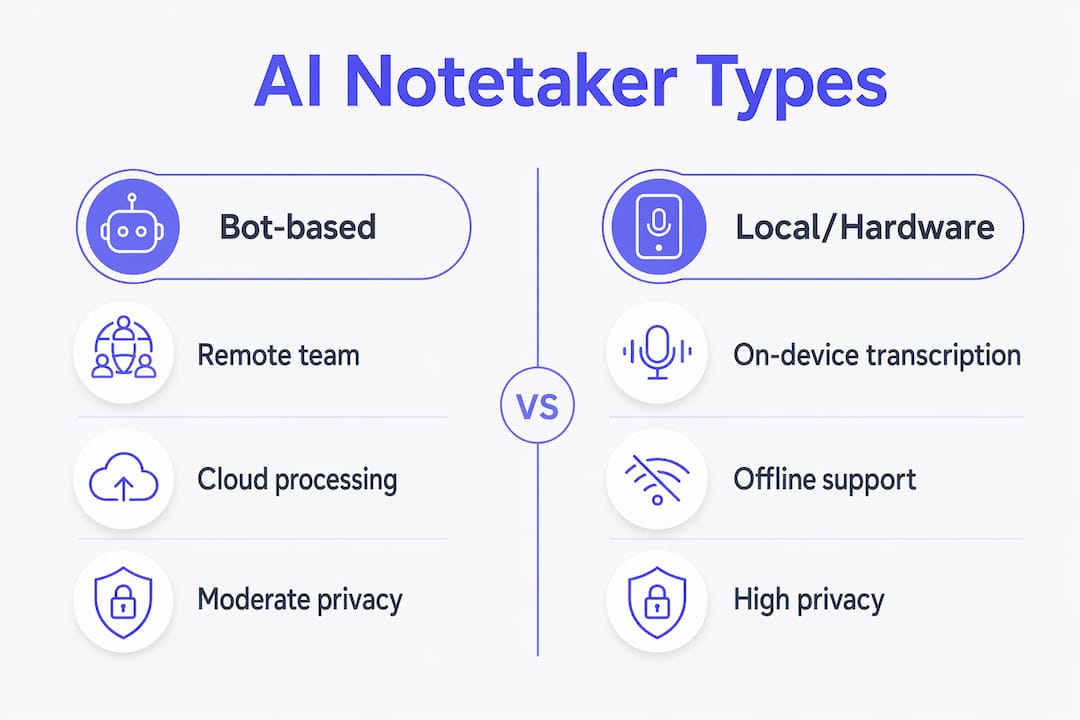
Experts categorize AI notetakers into three main types: bot-based tools, local or on-device tools, and hardware devices. Each type fits a different professional context and carries different privacy tradeoffs.
Bot-based AI notetakers
Bot-based tools join your Zoom, Google Meet, or Microsoft Teams call as a digital participant. They capture audio through the meeting platform, transcribe in the cloud, and sync notes to your CRM or project management tool automatically. This is the most common type for remote and hybrid teams. The tradeoff is that audio travels to a third-party server, which some organizations restrict.
Local and on-device AI notetakers
Local-first tools transcribe and summarize recordings entirely on your device. No meeting bot joins the call. No audio leaves your machine. This approach suits legal teams, healthcare organizations, and anyone handling sensitive client data. The processing happens on your Mac or PC, and the output stays under your control.

Professionals in high-security environments go even further. Fully offline or air-gapped tools perform all transcription and summarization on local hardware with zero cloud transfer. This is niche, but it is the only viable option for government contractors, regulated financial firms, and similar contexts.
Hardware AI notetakers
Hardware devices are physical recorders purpose-built for in-person meetings. A credit-card-sized device sits on the conference table and captures audio independently, with no phone or laptop required. Hardware notetakers offer up to 30 hours of continuous recording, 64 GB of local storage, and 60 days of standby time. That combination makes them reliable for boardroom sessions, client site visits, and off-site workshops where phone use feels intrusive.
Pro Tip: If your company has a data residency policy, confirm whether your AI notetaker processes audio in a region that complies before your first call.
| Type | Best for | Privacy level |
|---|---|---|
| Bot-based | Remote and hybrid teams | Moderate (cloud processing) |
| Local/on-device | Sensitive data environments | High (no cloud upload) |
| Hardware device | In-person meetings | High (local storage) |
How do AI notetakers support global and multilingual teams?
Language is no longer a barrier for teams using modern AI notetaker software. Current tools support up to 57 languages, making automatic transcription and summarization practical for multinational organizations running calls across the Americas, Europe, and Asia-Pacific.
The practical benefit for global teams goes beyond translation. When a Tokyo-based product manager and a New York-based VP of Sales finish a call, both walk away with the same structured summary in their preferred language. No one has to take manual notes. No context gets lost in the handoff.
Privacy matters at the international level too. Reputable tools delete audio from servers within 24 hours of processing. That practice aligns with data protection expectations in the US and abroad, and it reduces the risk of sensitive call content sitting in a vendor’s cloud indefinitely.
For multinational sales teams, the combination of multilingual support and fast deletion policies removes two of the biggest objections to adopting a shared AI recorder and note taker across regions.
- Automatic language detection removes the need to configure settings per call
- Summaries in the local language reduce miscommunication in follow-up
- Consistent note structure across regions makes pipeline reviews cleaner
- Privacy-compliant audio handling satisfies legal and compliance teams globally
How to integrate AI notetakers into your existing workflow
Integration is where AI notetaker software pays for itself. A transcript sitting in a separate app is just a document. A transcript that triggers a Salesforce update, creates a Notion task, and sends a Slack message to your champion is a workflow.
Here is a practical integration sequence for sales and revenue teams:
- Connect your calendar. Most tools auto-join meetings via Google Calendar or Microsoft Outlook. Zero manual setup per call.
- Link your CRM. Push call summaries, action items, and deal notes directly to Salesforce, HubSpot, or your CRM of choice. This eliminates post-call data entry.
- Set up task automation. Route action items to Asana or Notion automatically. Assign owners based on who was mentioned in the transcript.
- Automate follow-up emails. Use AI-generated summaries as the basis for post-call follow-up emails. The AI drafts the message; you review and send.
- Share selectively. Send the relevant summary section to each stakeholder rather than the full transcript. A CFO does not need the technical deep-dive; a CISO does not need the pricing discussion.
The core value here is clear. Integrating AI notes with business workflows saves professionals hours of manual work every week. That time compounds fast across a team of ten or twenty reps.
Pro Tip: Build a naming convention for your meeting types before you start. Labeling calls as “discovery,” “demo,” or “renewal” lets your AI notetaker route summaries to the right pipeline stage automatically.
For sales teams specifically, Trailercast takes this integration further. Its AI notetaker for discovery calls joins Zoom, Meet, and Teams automatically, transcribes speaker-by-speaker, and builds an evolving Deal Brief that spans every call in the opportunity. Every transcript is searchable, and the system distinguishes demo calls from qualifying calls to route each into the correct pipeline stage.
Key Takeaways
The most effective AI notetaker strategy combines the right tool type with direct workflow integration, turning meeting audio into structured data that drives deals and decisions forward.
| Point | Details |
|---|---|
| Choose the right type | Match bot-based, local, or hardware tools to your privacy requirements and meeting format. |
| Prioritize integration | Connect your notetaker to your CRM, task manager, and communication tools to eliminate manual entry. |
| Use conversation intelligence | Talk-time analysis and sentiment tracking turn transcripts into coaching and deal-risk signals. |
| Support global teams | Tools supporting 50+ languages with fast audio deletion satisfy both usability and compliance needs. |
| Automate follow-up | AI-drafted follow-up emails from call summaries cut post-meeting admin time significantly. |
The part most teams get wrong about AI notetakers
I have watched sales teams adopt AI notetaker software and immediately declare victory. They have transcripts. They have summaries. The problem is they treat the transcript as the output.
The transcript is not the output. The action item is the output. The updated CRM record is the output. The follow-up email your champion can forward to the CFO is the output. When teams stop at the transcript, they have replaced one passive artifact (handwritten notes) with another (a text file nobody rerereads).
The second mistake I see is ignoring the privacy architecture entirely. A bot-based tool is fine for most sales calls. It is not fine for a board-level conversation about an acquisition, a legal debrief, or a healthcare intake session. Professionals who pick one tool for every context eventually hit a wall. The smarter move is to understand the three types and keep a local or hardware option available for sensitive situations.
The third thing worth saying: conversation intelligence is underused. Talk-time ratios, sentiment shifts, and keyword tracking are not vanity metrics. They tell you whether your reps are talking too much, whether a deal is going cold, and whether your discovery questions are landing. Teams that use these signals in weekly coaching sessions improve faster than teams that just read transcripts.
The best AI notetaker is not the one with the most features. It is the one your team actually uses, connected to the tools they already live in.
— Daniel
Trailercast brings AI note-taking into the full deal cycle
Most AI notetaker tools stop at the call. Trailercast starts there and keeps going. The platform’s conversation intelligence layer joins Zoom, Meet, and Teams automatically, produces structured summaries and action items, and builds a searchable Deal Brief across every call in the opportunity.

From there, Trailercast turns call recordings into AI-edited demo trailers, buyer-facing Decision Rooms, and post-close handoff briefs. Your champion gets a shareable asset. Your CS team gets full deal context the moment the contract signs. The whole deal lifecycle runs in one workspace at $59 per seat per month, billed annually, with a free trial and no credit card required.
FAQ
What is an AI notetaker?
An AI notetaker is software that automatically records, transcribes, and summarizes spoken content during meetings. It extracts action items and integrates notes with business tools like CRMs and project management platforms.
How accurate are AI notetakers at transcription?
Accuracy varies by tool and audio quality, but leading AI transcription tools perform well in clear audio conditions with distinct speakers. Speaker-by-speaker transcription improves accuracy by reducing confusion between voices.
Do AI notetakers work for in-person meetings?
Yes. Hardware AI notetakers are purpose-built for in-person sessions, offering up to 30 hours of continuous recording and local storage with no phone or cloud service required.
Are AI notetakers secure for sensitive business conversations?
Security depends on the tool type. Local and on-device tools process audio entirely on your machine with no cloud upload. Air-gapped tools go further, keeping all data on local hardware with zero external transfer.
What languages do AI notetakers support?
Modern AI notetaker software supports up to 57 languages, making them practical for multinational teams running calls across multiple regions and time zones.